Invoiced vs Paidnice comes down to disclosure and the ledger. Choose Paidnice if you run Xero or QuickBooks Online and want to check price, fee grain and reviews before a sales call, from $69 a month. Choose Invoiced if your receivable sits in NetSuite, Sage Intacct or Dynamics 365 Business Central; it publishes no price, rating or fee grain.
- Price: Paidnice from $69 a month; Invoiced not published, quoted through sales.
- Rating: Paidnice 5.0 from 83 on the Xero App Store; Invoiced publishes no review-platform rating.
- Fee grain: Paidnice per customer group, posted to the ledger; Invoiced not documented.
Choose Paidnice if you run Xero or QuickBooks Online and want to compare price, fee grain and reviews before any sales call. Choose Invoiced if your receivable sits in NetSuite, Sage Intacct, Dynamics 365 Business Central or QuickBooks Desktop and you can run a sales-led evaluation.
This page is also a guide to evaluating a vendor that has decided to tell you nothing until you speak to sales, and what to insist on hearing when you do.
The one thing Invoiced does confirm carries the page on its own: NetSuite, Sage Intacct and Dynamics 365 Business Central as named integrations, which most tools sold to Xero and QuickBooks businesses do not offer at any price.
What accounts receivable software is (and what it is not)
Accounts receivable software works the invoices a business has already raised: it chases them, issues statements, takes payment and, in some products, prices lateness. Paidnice documents each of those jobs. Invoiced documents its integrations and leaves most of the rest to a sales call.
On the Paidnice side of this page, the category covers these jobs:
- Email, two-way SMS and WhatsApp reminders per customer group, with escalation, disputes, payment promises and manual task workflows
- Automatic statements, including consolidated parent and child statements
- An invoice late fee and statement interest, posted to the ledger
- Payment plans with deposits, installments and auto-pay, and a portal with pay-now links
It is not the ledger. The receivable stays in Xero, QuickBooks Online or an ERP such as NetSuite, and the software reads it. That is why the ledger question decides this page: Invoiced publishes integration pages for NetSuite, Sage Intacct, Dynamics 365 Business Central and QuickBooks Desktop, and Paidnice is native to Xero and QuickBooks Online and reaches other cloud ERPs on the Custom plan.
It is not a credit bureau. No credit-checking feature was found for Invoiced. Paidnice runs native credit checks from each customer's payment behavior, and Creditsafe bureau checks through the API on the Custom plan.
Where it sits: between the ledger and the customer. Paidnice reads the open invoices and writes back only what it raises, a late fee or interest charge posted as a Draft or Approved invoice.
Published price: Paidnice prints one, Invoiced quotes through sales
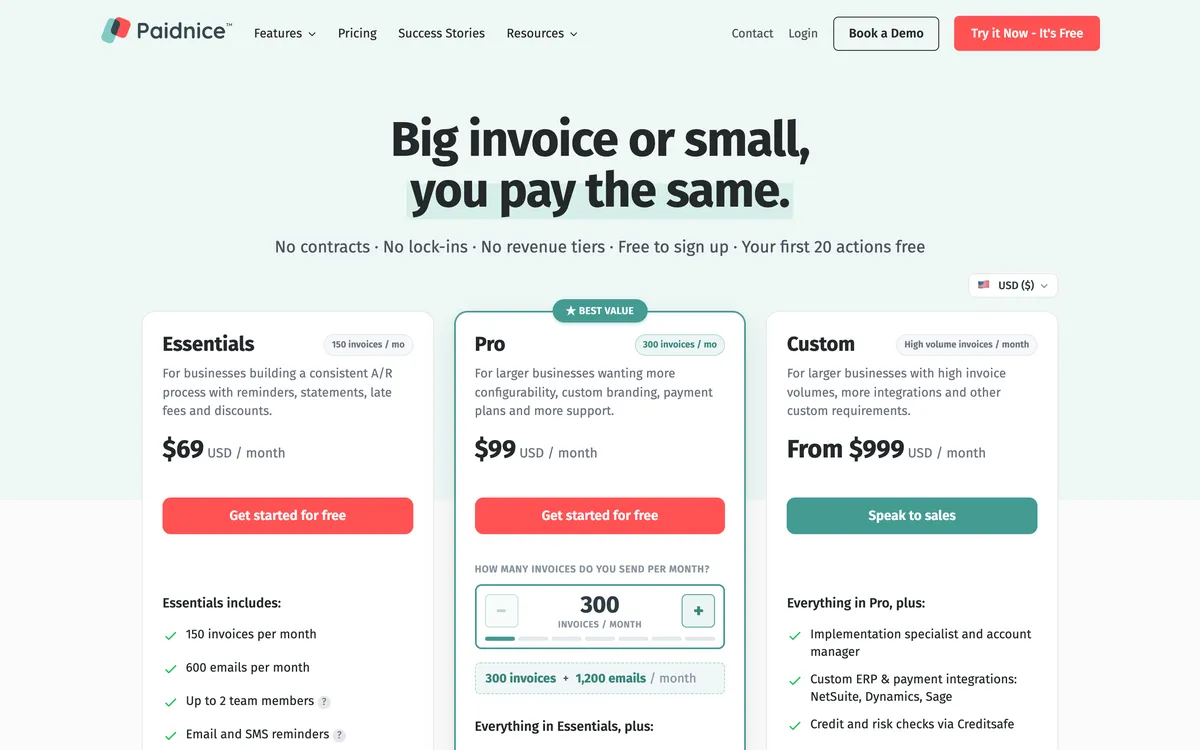
Paidnice prints $69 a month on Essentials, $99 on Pro and from $999 on Custom. Invoiced prints no figure anywhere in its public materials, so the entry cost is whatever sales quotes.
Unpublished pricing is normal at the enterprise end of this category and unusual at the small-business end, so the absence tells you who the product is being sold to before a single feature is discussed.
It also has a practical effect on your week: you cannot shortlist Invoiced without a meeting, and you cannot compare that meeting's outcome against anything until you have had it.
The same asymmetry runs through the rest of the evidence. Paidnice carries 5.0 from 83 Xero App Store reviews and 4.9 from 14 on Capterra. Invoiced publishes no review-platform rating and has no Xero App Store listing, so none is quoted here.
On the Paidnice side the meter is worth reading as carefully as the number.
The price steps with invoices processed in a month, from 150 on Essentials to 4,000 on the top Pro tier, with no per-seat fee on any plan, and customers are charged in their own currency from a fixed local price table rather than a moving exchange-rate conversion.
Add-ons decide the real bill: $29 a month for each further Xero or QuickBooks Online organisation, and SMS charged per message.
What "Not documented" means on this page, and why several cells carry it
Three closed values do the work on this page. On most comparisons they are housekeeping. Here they are the argument.
"Not published" means the vendor does not print a figure. It is a fact about disclosure rather than about the product. Invoiced's entry cost and its revenue fit both carry it.
"Not documented" means the vendor does not document the capability. It is not a claim that the capability is missing. Invoiced's late fee grain, its interest calculation, its reminder grain, its statements, its payment plans, its payments and its rating all carry it.
"None found" means no evidence either way on a capability a vendor would normally advertise if it had it. Invoiced's SMS channel carries it.
The rule that follows is the one worth knowing before you read the table. A criterion that cannot be scored for a tool is excluded from the ranking rather than counted against it.
Invoiced is not marked down for publishing no price; it is simply not scored on entry price, and the same goes for its rating. It leads on ledger coverage, on the evidence it does publish.
That is a deliberately generous reading and it is the only defensible one, because an unmeasured capability is not an absent capability. What it is, from a buyer's seat, is a capability you cannot compare, and the gap between those two sentences is exactly what the first sales call has to close.
- Paidnice
- Both a fee and interest. Two charge types on the same customer group, posted to the ledger as an approved or draft invoice, recalculated at send, netted against credit on the account, and run by multiple policies at once because policies sit under customer groups.
- Invoiced
- Not documented. A late-fee automation use case is published, but the trigger, the frequency, the flat-versus-percentage handling and whether interest is computed at all are not documented in public materials, so any charge should be assumed manual until the vendor confirms otherwise.
Paidnice and Invoiced compared: the table
Read this one as an evidence exhibit rather than a scorecard. Every filled cell on the left was read off a published page; every closed value on the right is a disclosure the vendor chose not to make.
 |
Invoiced | |
|---|---|---|
| Best for | Xero or QuickBooks Online teams who compare before a sales call | ERP or QuickBooks Desktop teams able to run procurement |
| Revenue fit | Yes (any size up to $50m a year, or 50,000 invoices a year) | Not published; positioning is US mid-market and enterprise |
| Billing model | Flat monthly price by invoice volume, charged in the customer's own currency, no per-seat fee | Not published; quoted through sales |
| From (monthly) | $69 | Not published |
| Ledger integrations | Xero, QuickBooks Online; NetSuite, Sage Intacct, MYOB and Dynamics 365 Business Central on the Custom plan | Integration pages published for Xero, QuickBooks Online, QuickBooks Desktop and Enterprise, NetSuite, Sage Intacct and Dynamics 365 Business Central |
| Late fee grain | Yes (per customer group, two charge types, posted to the ledger) | Not documented; a late-fee automation use case is published, the in-product behavior is not |
| Interest | Yes (statement interest on the whole overdue balance, compounding on by default) | Not documented |
| Reminder grain | Yes (per customer group, with escalation, disputes and payment promises) | Not documented |
| SMS | Yes (two-way SMS and WhatsApp, replies land in Paidnice; SMS charged per message) | None found |
| Statements | Yes (automatic, including parent and child consolidated) | Not documented |
| Payment plans | Yes (deposits, installments and auto-pay through Stripe and Pinch) | Not documented |
| Payments | Yes (customer payment portal with pay-now links, through Stripe and Pinch) | Not documented |
| AI | Advanced Reads customer replies, drafts answers and follow-up actions (like PO updates) for your approval; MCP server for Claude, ChatGPT and other agents | Advanced Agentic AI (Assist, Automate, Advise) and CashMatch AI matching |
| Rated | 5.0 from 83 on the Xero App Store, 4.9 on Capterra | Not documented |
"Not documented" means the vendor does not document the capability. "Not published" means the vendor does not print a figure. "None found" means no evidence either way. Prices are the vendor's published from-price. Check current pricing with the vendor.
1. Paidnice
Best for a Xero or QuickBooks Online business that wants to finish the evaluation without booking a call, from $69 a month
What is it best for?
For a finance team that can read the price, the fee grain, the rating and the review count before it speaks to anybody, and would like to keep it that way.
- Fits
- Businesses on Xero or QuickBooks Online of any size up to $50m a year, or 50,000 invoices a year, with or without a credit controller
- Regions
- United States, United Kingdom, Australia, New Zealand, Canada, South Africa. Founded 2022, head office in Auckland, team distributed across New Zealand, Australia and Portugal
- Entry cost
- $69/mo on Essentials, covering 150 invoices, 600 emails and up to 2 team members; Pro from $99/mo with unlimited users and no per-seat fee; Custom from $999/mo, quoted for an ERP connection at any volume. A multi-entity add-on is $29/mo per further organisation. Signing up is free and the first 20 actions are free, with no credit card. Check current pricing with the vendor.
- Rated
- 5.0 from 83 Xero App Store reviews; 4.9 from 14 on Capterra
- Awards
- Winner, New Zealand Small Business App of the Year, Xero Global App Awards 2026; 2025 Xero Global Small Business App of the Year
- Runs on
- Xero, QuickBooks Online, Stripe, Pinch Payments, CloudDepot, Zapier. HubSpot and Pipedrive through BCC logging. Any cloud ERP on the Custom plan, including NetSuite, Sage Intacct, MYOB and Dynamics 365 Business Central
- Late fees and interest
- Yes, two charge types on the same customer group: an invoice late fee per overdue invoice, and a statement interest charge on the whole overdue balance. Compounding is on by default, interest can track the Bank of England base rate for UK trading, and the charge is raised as an approved or a draft invoice on the ledger
- Does best
- Charges that post to the ledger in Xero and QuickBooks Online, so the fee enters the customer's payables rather than sitting in an email
Every operating detail below is published, priced and dated, which is the whole of the comparison this page can run. Two charge types sit on the same customer group: an invoice late fee per overdue invoice, and a statement interest charge calculated per customer on the whole overdue balance.
The interest figure is recalculated at the point the statement sends rather than fixed at the last policy run, netted against any credit on the account, and configurable down to the tax rate, the income account, and whether the resulting document is raised as approved or as draft.
Where the charge lands is the part that creates leverage, and it is documented rather than implied. Only a posted invoice on the ledger enters the customer's payables, their aged payables report and their next payment run, and only in that form is the charge a receivable, evidence for escalation, and something a credit note can be netted against.
Multiple policies run at once, because policies sit under customer groups. Compounding is on by default, so simple interest is the deliberate choice rather than the other way round.
The rest is the ordinary ladder, and it is also written down.
Email and SMS reminders per customer group with custom templates and custom-domain sending on Pro and above, escalation and manual task workflows, prompt payment discounts, quote and estimate reminders, automatic statements including consolidated parent and child statements, and payments through Stripe and Pinch with a portal carrying pay-now links, deposits, installments and auto-pay.
Paidnice uses AI to read what a customer replies, draft the answer, detect PO requests, log payment promises and find the reason behind a dispute. A person approves each drafted reply before it sends, unless you pre-approved that action type. The AI is live for all customers on Xero and QuickBooks. Customers can query an invoice or promise to pay from the portal. On Pro and above, staff can call a customer from Paidnice, and Paidnice records and transcribes the call and saves it to the customer's timeline. Paidnice also prints and posts letters at US$2.00 each, on Pro and up. Its MCP server and public API, on Pro and Custom, connect Claude, ChatGPT or any agent with a custom connector to triage replies, log promises and disputes, send reminders and work escalations, with one connection for every organisation you tick.
Limitations with Paidnice. The entry tier covers up to 2 team members, and unlimited users start on Pro, so a five-person AR function is on the higher tier from day one. There is no time-limited trial: the first 20 actions are free, with no time limit and no card, so the free period ends on use, not on a date.
It is native to Xero and QuickBooks Online. Other cloud ERPs, including NetSuite, Sage Intacct, MYOB and Dynamics 365 Business Central, connect on the Custom plan, so an ERP shop pays the Custom price to get there.
There is no QuickBooks Desktop connector, and multi-entity groups pay a per-entity add-on on top of the plan.
Best suited for: Xero or QuickBooks Online businesses that want to read the price, fee grain and reviews before speaking to anyone. The drawback is that ERPs are Custom-plan builds, there is no QuickBooks Desktop connector, and unlimited users start on Pro.
2. Invoiced
Best for a US finance team whose receivable sits in NetSuite, Sage Intacct or Dynamics 365 Business Central, and which has a procurement process to run it through
What is it best for?
For a buyer who can afford the time a sales-led evaluation costs, in exchange for connectors that most tools in this category do not offer at any price.
- Fits
- US mid-market and enterprise finance teams. No revenue band is published, and the site's persona pages address CFOs, controllers and AR managers rather than owner-operators
- Regions
- United States. Invoiced was acquired by Flywire, and its public materials now sit alongside Flywire's
- Entry cost
- Not published. Invoiced prints no price anywhere in its public materials, so the entry cost is whatever sales quotes.
- Rated
- Not documented. Invoiced publishes no review-platform rating and has no Xero App Store listing, so none is quoted here
- Awards
- None found
- Runs on
- Integration pages are published for Xero, QuickBooks Online, QuickBooks Desktop and QuickBooks Enterprise, NetSuite, Sage Intacct and Dynamics 365 Business Central
- Late fees and interest
- Not documented. A late-fee automation use case is published and a payment-terms library sits beside it, but the in-product behavior, the grain and whether interest is calculated at all are not documented
- Does best
- ERP reach. NetSuite, Sage Intacct and Dynamics 365 Business Central are named integrations, which most tools sold to Xero and QuickBooks businesses do not offer at any price
Named ERP integrations are the one thing on this side of the page that can be confirmed, and they are worth confirming. Integration pages are published for NetSuite, Sage Intacct and Dynamics 365 Business Central, and for QuickBooks Desktop and Enterprise as well as QuickBooks Online and Xero.

Most tools sold to Xero and QuickBooks businesses reach none of the three ERPs at any price, and Paidnice reaches them only on the Custom plan.
Everything else has to be taken on trust for now. There is no price anywhere in the public materials, no documented grain for a late fee or an interest charge, and no verified rating on any public review platform.
The published content around receivables is substantial, with a payment-terms hub, a glossary covering the vocabulary a new AR hire needs, and a use-case page devoted to late-fee automation, but none of it is the operating detail a comparison runs on.
The call script further down this page covers what to ask. Six questions, asked once, fill in most of the empty cells in the table above, and the answers come back in a form you can hold the vendor to.
Limitations with Invoiced. No price is published, so the evaluation starts with a sales conversation and a quote rather than a number you can sign off. Most of the product surface is not documented in public materials, including reminders, payments, statements and payment plans.
The enterprise pivot deprioritises the Xero and QuickBooks audience the integration pages nominally serve, which matters if you are a small business arriving from one of those pages. No credit-checking feature was found, no SMS channel was found, and no verified third-party rating could be confirmed, so there is no independent evidence of how the product performs in use.
Best suited for: US finance teams whose receivable sits in NetSuite, Sage Intacct, Dynamics 365 Business Central or QuickBooks Desktop and who can run a sales-led evaluation. The drawback is that no price, rating or fee behavior is published, so most of the product cannot be checked before a call.
Six things to ask Invoiced on the first call
Six questions, each aimed at a cell the vendor leaves empty. The answer format matters as much as the answer, so insist on the one named.
- At what grain does the late fee apply: per account, per customer, or per invoice? Ask where the setting lives in the product, not what the use-case page says. A charge that can only be set once for the whole account is a different product from one set per customer group.
- Is interest calculated at all, and on what balance? The two workable answers are an annual rate prorated per day on the overdue balance, or a percentage of the balance at the point the statement issues. If the answer is that the late fee covers it, interest is not calculated.
- What is the entry price, and what meters it? Get a figure and a unit: users, invoices, transaction value or revenue band. The unit is what tells you where the bill goes in year two.
- Which review platform carries a rating we can read? Ask for the platform and the review count, not a set of reference calls. A verified public rating and three curated references are not the same evidence.
- Are the Xero and QuickBooks Online connectors maintained at the same level as the ERP ones? The integration pages exist. Ask when each was last shipped against, and whether the small-ledger builds sit on the same release train.
- What is the roadmap for small-ledger customers under Flywire? The acquisition moved the public positioning upmarket. If your receivable sits in QuickBooks Online, this is the question that decides whether the product is still built for you.
Write the six answers down and most of the table on this page fills itself in. That is the whole of what a sales-led evaluation can be made to give you before the demo starts, and it is enough to compare against a vendor that published the same six things without being asked.
Where the receivable actually sits: ERP against small-business ledger
This is the one row where Invoiced leads, and it is enough to decide the page for a specific kind of buyer.
Invoiced publishes integration pages for NetSuite, Sage Intacct and Dynamics 365 Business Central, and for QuickBooks Desktop and Enterprise as well as QuickBooks Online and Xero. Most tools sold into this category do not reach the three ERPs at any price, and none of them reaches Desktop.
Paidnice is native to Xero and QuickBooks Online. NetSuite, Sage Intacct, MYOB and Dynamics 365 Business Central connect on the Custom plan from $999 a month, so an ERP shop pays the Custom price. Sync is instant and the full feature set runs on the ERP.
There is no QuickBooks Desktop connector at all. MYOB runs the other way: Paidnice reaches it on Custom, and Invoiced does not list it.
So the split is clean. If your receivable sits in an ERP, Invoiced is a legitimate shortlist candidate and the price is a conversation worth having.
If it sits in Xero or QuickBooks Online, you are being routed into a procurement process for a product whose fee grain you cannot check, in order to buy connectors you were never going to use.
What the Flywire acquisition changed in the public materials
Invoiced was acquired by Flywire, and its public materials now sit alongside Flywire's. The change is visible in what the site leads with rather than in what it removed.
The positioning has moved towards the enterprise: ERP integrations first, a gated white-paper library, persona pages written for CFOs, controllers and AR managers, and ROI calculators aimed at a finance leader building a business case rather than an owner-operator picking a tool.
The Xero and QuickBooks integration pages are still maintained, so those ledgers have not been dropped. They are simply not what the site argues for any more. A vendor is free to choose its market. The change is a reason to ask question six before you invest a quarter in an evaluation.
Which accounts receivable software fits your use case?
Start from the ledger, then from how much you need to check before a call. Most rows settle on one of those two questions.
| Use case | Start with | Why |
|---|---|---|
| Receivable in Xero or QuickBooks Online | Paidnice | Native connectors and a published price from $69 a month. |
| Receivable in NetSuite, Sage Intacct or Dynamics 365 Business Central | Invoiced | Named integration pages; Paidnice reaches these as Custom-plan builds from $999 a month. |
| A QuickBooks Desktop entity in the group | Invoiced | Integration pages for Desktop and Enterprise; Paidnice has no Desktop connector. |
| Reminders and statements only, no late fees | Paidnice | Reminders per customer group and automatic statements are documented; Invoiced documents neither. |
| Late fees and interest you can check before buying | Paidnice | Fee grain and interest calculation are published; the Invoiced in-product behavior is not documented. |
| Ledger on MYOB | Paidnice | Paidnice reaches MYOB on the Custom plan; Invoiced does not list it. |
Questions buyers ask before booking a demo they cannot compare
The questions that come up when one side of a shortlist is fully documented and the other side is a form.
Why does this page print "Not documented" rather than "No"?
Because the two mean different things. "Not documented" says the vendor does not document the capability, not that it is missing. Where a vendor publishes nothing, the cell says so rather than guessing, and the criterion is excluded from the ranking rather than counted against the tool.
Is Invoiced expensive?
Unknown. No figure appears anywhere in its public materials, so budget for a quote and ask what meters it in the same conversation. Paidnice publishes $69 a month on Essentials and $99 on Pro.
Does Invoiced charge late fees?
A late-fee automation use case is published, and the in-product behavior behind it is not documented: not the trigger, not the frequency, not the flat-versus-percentage handling, and not whether interest is computed at all. Treat any charge as manual until the vendor documents otherwise. Paidnice computes both a fee and interest at customer-group grain and posts them to the ledger.
Should a QuickBooks Online business book the demo at all?
Only if something specific pulls you there, such as a Desktop entity in the group. Otherwise you are running a procurement process for connectors you will not use, against a product whose fee grain you cannot verify beforehand.
What can I compare before the call?
On the Paidnice side: price, meter, fee grain, interest calculation, statement behavior, payment plans, integrations and a verified review base. On the Invoiced side: the named integrations, and that is the whole list. Everything else is question one through six.
Does either tool do credit checking?
Paidnice does: it runs native credit checks from each customer's payment behavior, and Creditsafe bureau checks through the API on the Custom plan. No credit-checking or risk-scoring feature was found for Invoiced, so a business that wants a credit limit set from a bureau file on a standard plan needs a third tool alongside either one.
Does Invoiced reach QuickBooks Desktop?
It publishes integration pages for QuickBooks Desktop and Enterprise. Paidnice has no Desktop connector of any kind, so on that row Invoiced is the only one of the two.
Priced alternatives if the ERP is not the reason you are here
Buyer's guide
Best accounts receivable software
The pillar guide: pick by size and accounting system, with a recommendation matrix.
By accounting system
Best AR automation for Xero
The tools that pick up where Xero's own reminder stops, compared.
By accounting system
Best AR automation for QuickBooks
The tools that pick up where QuickBooks Online stops, compared.
Late fees
How much can I charge in late fees?
What a late fee can legally be, and how to set the rate.