Payment plan software splits an existing invoice into a schedule and collects each installment. Paidnice is our #1 pick for a Xero or QuickBooks Online business of any size up to $50m a year that wants the plan written on the invoice it already raised. Alternative Payments, Biller Genie, Chaser, ezyCollect and Kolleno follow, compared on who collects the plan.
| Tool | Fits |
|---|---|
| Paidnice | A Xero or QuickBooks Online business that wants a deposit, installments and auto-pay written against the invoice it already raised |
| Alternative Payments | A US service business that wants the customer financed over 30 to 150 days and itself paid in full upfront |
| Biller Genie | A US small business that wants the customer to request a plan through the portal and the merchant to approve it |
| Chaser | A team that wants to split one invoice weekly through to yearly on a wide ledger list, up to £4m on the entry tier |
| ezyCollect | An Australian or New Zealand business that wants installments collected by direct debit in three plan shapes |
| Kolleno | A NetSuite or SAP order-to-cash team that wants collections automations to follow the plan dates |
A US small business waits 29.1 days to be paid and settles 8.3 days past due, on Xero Small Business Insights data for June 2026, against 27.5 days a year earlier with lateness flat at 8.4.
A plan is what you offer the accounts that will never reach those numbers, and a New York supplier reaches that decision sooner than a Californian one.
Tools are compared on segment fit, plan grain, who collects the schedule, published price and verified rating.
What payment plan software is (and what it is not)
Payment plan software splits an invoice your business has already raised into a schedule of smaller payments, then collects each installment on its date, usually against a stored mandate so the payment is pulled rather than requested.
- Schedule: a deposit or down payment, then equal or custom installments at an interval the customer can service.
- Collection: auto-pay through Stripe, Pinch Payments, GoCardless or direct debit, so nobody sends a link twelve times.
- Chasing: reminders keyed to the installment that was missed, not to the original due date.
- Consequence: in some tools, a late fee or interest policy that still applies once a plan exists.
- Ledger: the plan is written against the invoice in Xero, QuickBooks Online or an ERP, so the receivable keeps its date and aged position.
It is not buy now, pay later. With a payment plan you keep the receivable and the credit risk; with financing such as Alternative Payments, a third party settles the invoice in full and carries the default.
It is not invoice finance or a debt collection agency, and it is not the ledger. The invoice, its tax point and the cash application stay in your accounting system, which the tool reads and writes back to.
Pure-play plan tools such as Partial.ly, Paythen and PaySimple sit outside the ledger entirely, so a business on Xero or QuickBooks Online reconciles two systems by hand.
How this list was put together
This list helps a business split an invoice it has already raised into installments, and collect each one on its date.
| What we checked | Where the evidence came from |
|---|---|
| Plan grain: against the existing invoice, or financed | Vendor help pages on payment plans |
| Deposit and auto-pay on the schedule | Vendor feature pages |
| Who chases the installments | Vendor workflow documentation |
| Payment rails | Vendor payment pages |
| Published from-price | The vendor's pricing page, and the last reported price where it is now hidden |
| Rating and review count | The Xero App Store, including the Australian store, G2 or Capterra |
Is scheduling a plan the same as collecting a plan?
No, splitting an invoice into installments and taking those installments are two separate jobs, and only some of these tools do both. Paidnice, ezyCollect and Kolleno hold a mandate and pull each installment on its date. Biller Genie relies on the customer's own autopay enrollment. Chaser writes the split and then carries on chasing the original due date.
The gap opens in month two. A schedule nobody pulls turns into a queue of manual follow-ups, and a schedule whose reminders still point at the original invoice date sends the wrong message to the one customer on the ledger who is doing what you asked.
Chaser is the clearest case, and worth understanding before you shortlist on grain. It splits a single invoice at any interval from weekly through to yearly. Its chasing then follows the original invoice due date rather than the installment dates, and its own documentation advises chasing the installments by hand.
So a plan Chaser created is chased against a date that no longer applies, at a customer who agreed the plan and is keeping to it.
Which makes the first shortlist question narrower than it looks. Every tool below offers payment plans. What separates them is whether a mandate is stored, who pulls against it, and what the tool does on the morning a pull does not clear.
Who carries the risk once the plan starts?
A payment plan is a credit decision wearing the clothes of a schedule. The moment you agree one, you have extended fresh terms to a customer who already missed the first set.
Five of the six tools here schedule your own receivable, so the money, the credit risk and the collection work all stay with you. Alternative Payments is the exception: it settles the invoice in full inside a day, charges your customer a fee of 3.0% to 7.0% by term, and absorbs the default itself.
That is the buy now, pay later shape: a third party settles the invoice and carries the default. Consumer-facing services such as Square through Afterpay and PayPal Pay Later are the same shape aimed at retail checkouts, and Alternative Payments sells it into B2B invoices.
That single choice sets everything downstream. Keep the risk and you need the tool to pull each installment and to tell you the moment one fails.
Sell the risk and the term and the fee stop being yours to set, the customer pays a fee they did not pay before, and an underwriter you do not control will decline some of your accounts.
You keep the receivable
- The invoice stays on your ledger at its original date
- You set the deposit, the interval and the count
- You carry the credit risk if the plan fails
- Biller Genie, Paidnice, Chaser, ezyCollect, Kolleno
A third party funds it
- The invoice is settled in full, usually inside a day
- The term and the fee are set by the financier
- The financier carries the risk and the missed payments
- Alternative Payments, and consumer buy-now-pay-later services
Two mechanisms, one phrase. The column you are in decides who absorbs the default, who sets the term, and who has to underwrite your customer.
What does each of the six tools do to the invoice?
Plan grain says how a schedule can be shaped, and the collection row says whether the plan runs itself. Grain on its own says only how the schedule can be shaped; the pairing says whether the plan runs itself or becomes a recurring diary entry.
 |
Alternative Payments | Biller Genie |  |
 |
 |
|
|---|---|---|---|---|---|---|
| Best for | Xero or QuickBooks Online plans written on the existing invoice | US service businesses wanting the customer financed, paid upfront | US small businesses letting customers request plans in the portal | Splitting one invoice weekly to yearly on a wide ledger list | AU and NZ businesses collecting installments by direct debit | NetSuite or SAP teams with automations following plan dates |
| Revenue fit | Any size up to $50m a year, or 50,000 invoices a year | Not published, tiers set by monthly processing volume | Not published, the bill scales with the value collected | £4m and under on the entry tier, tiers to £100m | Not published, tiers set by debtor count from 200 | Under £1m on BusinessPay, tiers to £1bn and above |
| From (monthly) | $69 | $199 up to $50,000 processed a month | $49.95 plus 0.50% of invoices collected (last reported; now hidden, request a quote) | £199 | A$275 plus a A$900 setup fee, annual billing (last published; now hidden, request a quote) | $650 per user |
| Ledger integrations | Xero, QuickBooks Online | QuickBooks Online, QuickBooks Desktop, Xero, Sage Intacct, NetSuite, Dynamics 365, Zoho Books, FreshBooks | QuickBooks Online, QuickBooks Desktop, Xero, AccountingSuite | Xero, QuickBooks, Sage, NetSuite, Dynamics 365, AccountsIQ, SAP | Xero, MYOB, QuickBooks Online, NetSuite, Dynamics, Sage 300 and Intacct, SAP Business One, Pronto Xi | NetSuite, SAP, Sage Intacct, Dynamics 365, Workday, Oracle JD Edwards, Xero, QuickBooks Online |
| Plan grain | Yes, against the Xero or QuickBooks Online invoice | Financed only, equal installments every 30 days over 30 to 150 days | Yes (customer requests, merchant approves each) | Yes, per invoice, weekly through to yearly | Yes, subscription, fixed amount or fixed count, weekly to monthly | Yes, weekly, monthly or bi-monthly splits |
| Deposit or down payment | Yes | Not applicable, the invoice is settled in full upfront | None found | None found | Not documented | No (no deposit option on a plan) |
| Auto-pay on the schedule | Yes | Yes | Yes (autopay with per-customer thresholds) | Not documented | Yes (Auto-Collect direct debit) | Yes (saved methods, scheduled and recurring payments) |
| Who chases the installments | The tool, alongside its own reminders and statements | Alternative Payments, on its own book | The customer's autopay mandate | The tool chases the original invoice due date, not the installment dates | The tool, by direct debit collection | The tool, through automations linked to the plan |
| Payment rails | Stripe, Pinch Payments | US ACH free to the payer, cards; PAD and EFT in Canada | Named US gateways such as USAePay and Authorize.Net, card and ACH | Chaser Pay on Stripe rails: cards, wallets, pay by bank, ACH | Cards, Apple Pay, Google Pay, direct debit, EFT, ACH in the US | Stripe, Blink, Adyen, GoCardless |
| Late fees and interest | Yes (per customer group) | None found | Yes (add-on, from 30 days past due, no interest calculation) | Yes (one global rule, and no fee on a payment-plan invoice) | None found | None found |
| AI | Advanced Reads customer replies, drafts answers and follow-up actions (like PO updates) for your approval; MCP server for Claude, ChatGPT and other agents | None No shipped AI feature found | None No AI in the product | None No AI features | Basic an AI email template generator as a paid add-on; Aimie is in early access | Advanced Insights, Copilot drafts and an autonomous Agent, in every tier |
| Rated (source, count) | 5.0 (83, Xero App Store) | 4.7 (11, G2) | 4.8 (27, Capterra) | 4.98 (374, Xero App Store) | 4.9 (35, Xero App Store AU) | 4.9 (117, G2) |
"Not documented" means the vendor does not document the installment behavior. "Not published" means the vendor prints no figure. "None found" means no evidence either way, so no plan mechanic is documented in either direction. Prices are the vendor's published from-price, in the currency the vendor prints, without conversion. Check current pricing with the vendor.
1. Paidnice, best for deposits, schedules and auto-pay on the existing invoice
Paidnice is a reminder, late fee and payment plan tool for Xero and QuickBooks Online, of any size up to $50m a year, with the plan written on the invoice, from $69 a month.
What is it best for?
Choose Paidnice if you run Xero or QuickBooks Online and want a deposit, a schedule and auto-pay set against the invoice you have already raised, rather than a separate one.
- Fits
- Businesses on Xero or QuickBooks Online of any size, up to $50m a year or 50,000 invoices a year, with or without a credit controller
- Regions
- United States, Canada, United Kingdom, Australia, New Zealand, South Africa. Founded 2022, Auckland head office, distributed team
- Entry cost
- $69/mo on Essentials, covering 150 invoices, 600 emails and up to 2 team members; Pro from $99/mo with unlimited users and no per-seat fee; multi-entity is a $29 per entity add-on.
- Rated
- 5.0 from 83 Xero App Store reviews; 4.9 from 14 on Capterra
- Awards
- Winner, New Zealand Small Business App of the Year, Xero Global App Awards 2026; 2025 Xero Global Small Business App of the Year
- Runs on
- Xero, QuickBooks Online, Stripe, Pinch Payments, CloudDepot, HubSpot, Pipedrive, Zapier. NetSuite, Sage Intacct, MYOB and Dynamics 365 Business Central on the Custom plan only
- Late fees and interest
- Yes. Two charge types on the same customer group, an invoice late fee and a statement interest charge, both raised on the ledger as Draft or Approved, with policies sitting under customer groups so several rules run at once
- Does best
- A plan written against the ledger invoice, with deposits, installments and auto-pay, sitting on the same customer group as the reminders, statements and fee policy
Paidnice is the enforcement layer on top of Xero and QuickBooks Online, and the payment plan is one action inside it rather than a separate product. The plan is set against the invoice that already exists on the ledger, so the receivable, its tax treatment and its aged position do not change while the customer pays it down.
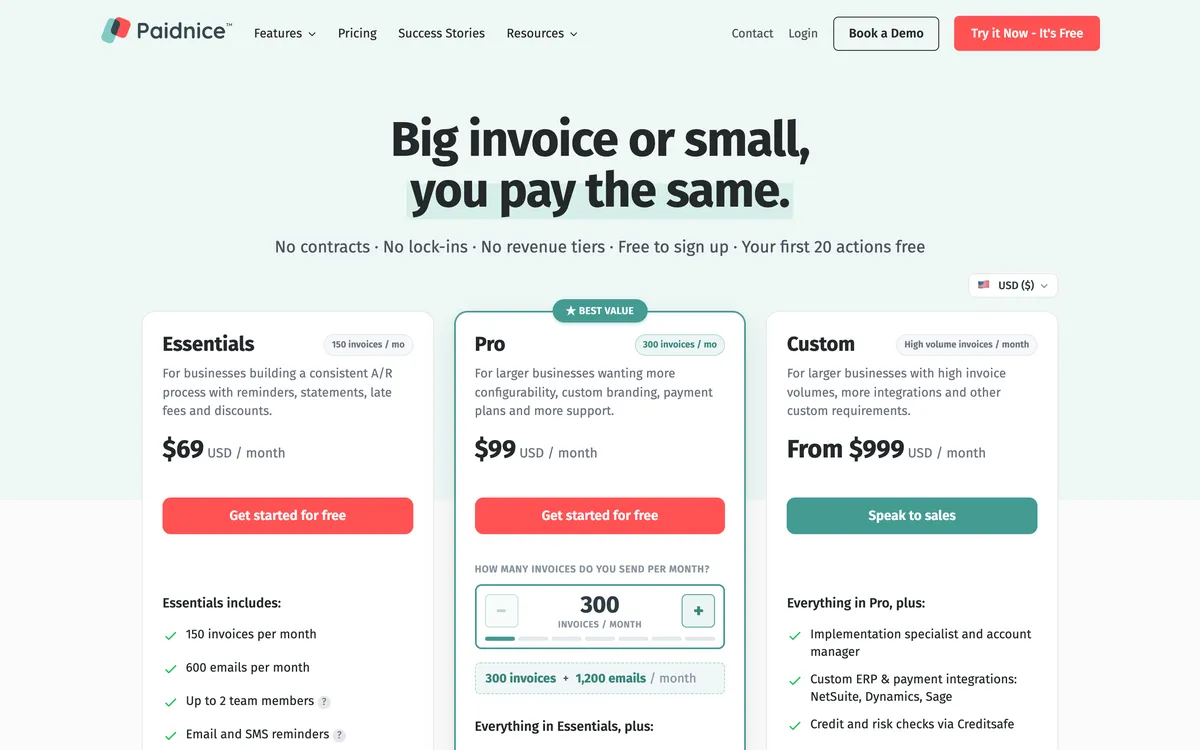
Collection runs through Stripe or Pinch Payments, which is where the deposit, the installments and the auto-pay mandate live, and the customer manages the balance through a payment portal. Reminders, statements including consolidated parent accounts, and the fee policy all sit on the same customer group as the plan, so a group that gets softer terms gets them consistently.
Limitations with Paidnice. Native to Xero and QuickBooks Online only, with the four Custom-plan ledgers built rather than connected as standard. Payment features differ between the two native ledgers, so which rails a plan can run on varies by ledger and by country.
The entry tier covers two team members, and multi-entity groups pay per entity. Chaser has the larger verified review base, 4.98 from 374 against 5.0 from 83.
Best suited for: A Xero or QuickBooks Online business of any size up to $50m a year that wants a deposit, installments and auto-pay written against the invoice it already raised. It is native to Xero and QuickBooks Online only, and the rails a plan can run on vary by ledger and by country.
Best Payment Plan Software: Which Tool Fits Which Business (1:39)
2. Alternative Payments, best for US service businesses wanting full payment upfront
Alternative Payments is a US financing service that pays the merchant in full upfront while the customer pays over time, from $199 a month up to $50,000 processed.
What is it best for?
Choose Alternative Payments if you run a US service business and want a customer to pay over 30 to 150 days while you receive the full invoice value inside a day.
- Fits
- US and Canadian service businesses, including managed service providers, accounting firms, business services and telecom. No revenue band is published; the tiers are set by monthly processing volume
- Regions
- United States and Canada. New York head office, founded September 2021. Canada is a reduced product: Quebec is excluded and installments are not offered there at all
- Entry cost
- $199/mo up to $50,000 processed a month, $499/mo up to $100,000, custom above that, with no implementation fee. The Canadian entry tier is C$299. Contract length is not published.
- Rated
- 4.7 from 11 reviews on G2
- Awards
- None found
- Runs on
- QuickBooks Online, QuickBooks Desktop, Xero, Sage Intacct, NetSuite, Dynamics 365 and Business Central, Zoho Books, FreshBooks. PSA connectors for ConnectWise, Datto Autotask, HaloPSA and SuperOps
- Late fees and interest
- None found. Nothing in the vendor's materials calculates, posts or accrues a late fee or interest. The only charge on late money is the financing fee, which the customer pays
- Does best
- Financing the plan and paying the merchant the full invoice upfront, carrying the credit risk and handling the missed payments itself
- Customers
- Named on its website: TeamLogic IT, Sage IT and CMIT Solutions Idaho. TeamLogic IT Utah Valley North's case study reports 40% of invoices paid on creation.
Alternative Payments is the odd one out here on purpose. Its Pay in Installments product runs equal installments every 30 days over a term of 30 to 150 days, with a fee of 3.0% to 7.0% depending on term paid by the customer rather than by you.
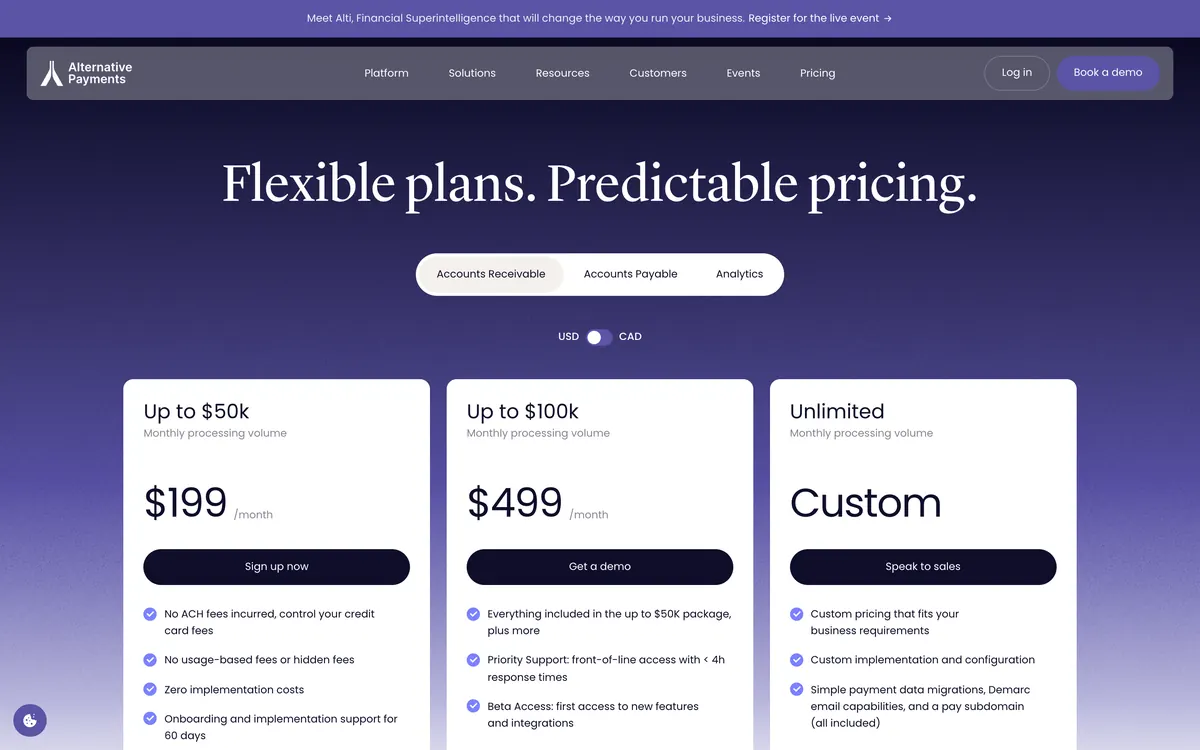
The merchant receives the full invoice value upfront and Alternative Payments carries the credit risk from there, with most approvals inside 24 hours.
Around it sits a full AR and AP platform with ledger connections to eight systems, autopay with rules that trigger on days past due or before due, and Collections Assist, a success-priced human escalation where their team phones and emails the customer for you.
It also publishes a complete fee schedule before a sales conversation, which is unusual in this category.
Limitations with Alternative Payments. This is financing rather than a schedule you control: the term is fixed at 30-day steps between 30 and 150 days, the fee is paid by your customer, and Alternative Payments underwrites the buyer before approving anything.
Installments are unavailable in Canada, along with collections and financing generally, and Quebec is excluded outright. There is no late fee or interest engine and no statement run documented. The whole public review base is 11 reviews.
Best suited for: A US service business that wants a customer to pay over 30 to 150 days while it receives the full invoice value inside a day. It is financing rather than a schedule you control, the customer pays the fee, and installments are unavailable in Canada.
3. Biller Genie, best for US small businesses letting customers request plans
Biller Genie is a US invoicing and payment tool where the customer requests the plan and the merchant approves it, last reported at $49.95 a month plus 0.50% of invoices collected (now hidden, request a quote).
What is it best for?
Choose Biller Genie if you run a US small business and would rather a customer ask for a plan through the portal than have a controller negotiate one by email.
- Fits
- US small businesses on QuickBooks Online, QuickBooks Desktop, Xero or AccountingSuite with steady card and ACH volume. No revenue band is published; the bill scales with the value collected
- Regions
- United States. Founded 2019 with the software launched in 2020, head office in Orlando and an engineering office in Belfast
- Entry cost
- Last reported by third-party listings at $49.95/mo plus 0.50% of invoices collected, capped at $1,500/mo, with no contract and cancellation any time; Biller Genie now hides its prices, so request a quote. Payment plans are an add-on. The same listings last reported ACH as an add-on at $0.50 a transaction with a $20 monthly minimum and a $25 setup fee.
- Rated
- 4.8 from 27 reviews on Capterra, latest June 2025; 3.0 from 4 on G2; 2.33 from 3 on its Xero App Store listing, where one 1-star review says "Working with Biller Genie has been a headache"
- Awards
- Inc. 5000 number 259, 2024
- Runs on
- QuickBooks Online through a two-way sync, QuickBooks Desktop through a separate connector, Xero, AccountingSuite, and named gateways including USAePay, Maverick, Sola, Authorize.Net, Elavon and PayPal
- Late fees and interest
- Yes, through a Late Fee Manager add-on, on a fixed 30-day clock. Nothing counts as late until 30 days past due, charges then recur every 30 days into a finance charge account, there is no interest calculation, and no rule varies by customer
- Does best
- A customer-initiated request flow, so the plan starts from the payer and the merchant approves or rejects each request
Biller Genie is a payments product with receivables automation attached, and its payment plan follows the payments logic. The customer asks for installments through the branded portal and the merchant approves or rejects that request, rather than a controller building a schedule up front.
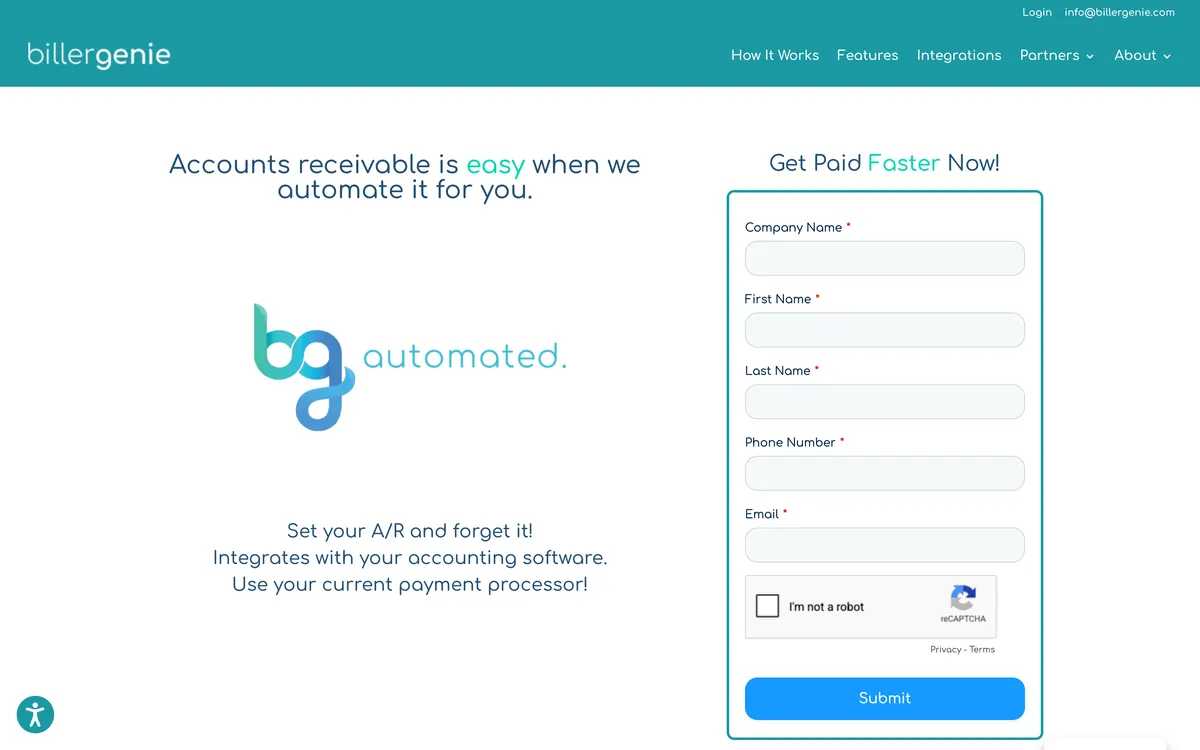
The rest of the stack is why a US small business shortlists it: named gateways including USAePay, Maverick, Sola, Authorize.Net, Elavon and PayPal, surcharging and dual pricing with dedicated checkout flows and automatic fee reconciliation, autopay with per-customer thresholds, and one of the few QuickBooks Desktop connectors in the category.
Biller Genie pushes its own merchant services, but its site and docs say you can connect your own gateway.
One point about the review base is worth carrying into a plan decision: two of the three Xero App Store reviews give 1 star, and a sync fault on a plan that fires every month repeats every month.
Limitations with Biller Genie. The plan is requested by the customer and approved one request at a time, so a controller cannot build a schedule up front, and payment plans are a paid add-on.
On the last reported rate, the 0.50% sits on top of the monthly fee and only stops growing at the $1,500 cap, which a business reaches at $300,000 collected in a month.
The vendor pushes its own merchant services for card and ACH, so ask which processor a quote assumes; its docs say you can connect your own gateway. There is no SMS channel. The G2 and Xero App Store scores sit well below the Capterra one.
Best suited for: A US small business that would rather a customer request a plan through the portal than have a controller build one. Plans are a paid add-on approved one request at a time, and the last reported 0.50% fee grows with the money collected.
4. Chaser, best for splitting one overdue invoice into installments
Chaser is a credit control tool with per-invoice installment schedules on a wide ledger list, from £199 a month for turnover up to £4m.
What is it best for?
Choose Chaser if your finance team wants to split a single overdue invoice into weekly or monthly installments without leaving the tool that already chases it.
- Fits
- Businesses running installment schedules alongside a chasing schedule; the entry tier is sized to £4m turnover and under, and the tiers run to £100m
- Regions
- UK-registered, trading since 2014, sells worldwide
- Entry cost
- £199/mo on Compact for turnover to £4m with 4 users; Core £599/mo to £10m; Complete £899/mo above that.
- Rated
- 4.98 from 374 Xero App Store reviews; 4.5 from 68 on G2
- Awards
- Xero App Partner of the Year 2023
- Runs on
- Xero, QuickBooks, Sage 50, Sage 200, Sage Intacct, Sage Business Central, NetSuite, Dynamics 365, AccountsIQ, SAP, HubSpot, Gmail, Outlook
- Late fees and interest
- Yes, with a carve-out that matters here. Four calculation types recalculated daily, but one global rule only, and no fee is raised on a payment-plan or partially paid invoice
- Does best
- Per-invoice installment schedules from weekly through to yearly, on a wide ledger list
- Customers
- Named on its website: Pact Coffee, Huttie and TaxAssist. Huttie's case study reports £15,000 of old debt recovered.
Chaser has been in the market since 2014 and sends reminders from the team's own Gmail or Outlook mailbox, adding SMS, letters, a payer portal and collection through Chaser Pay. Its payment plan splits one invoice into installments at any interval from weekly to yearly.
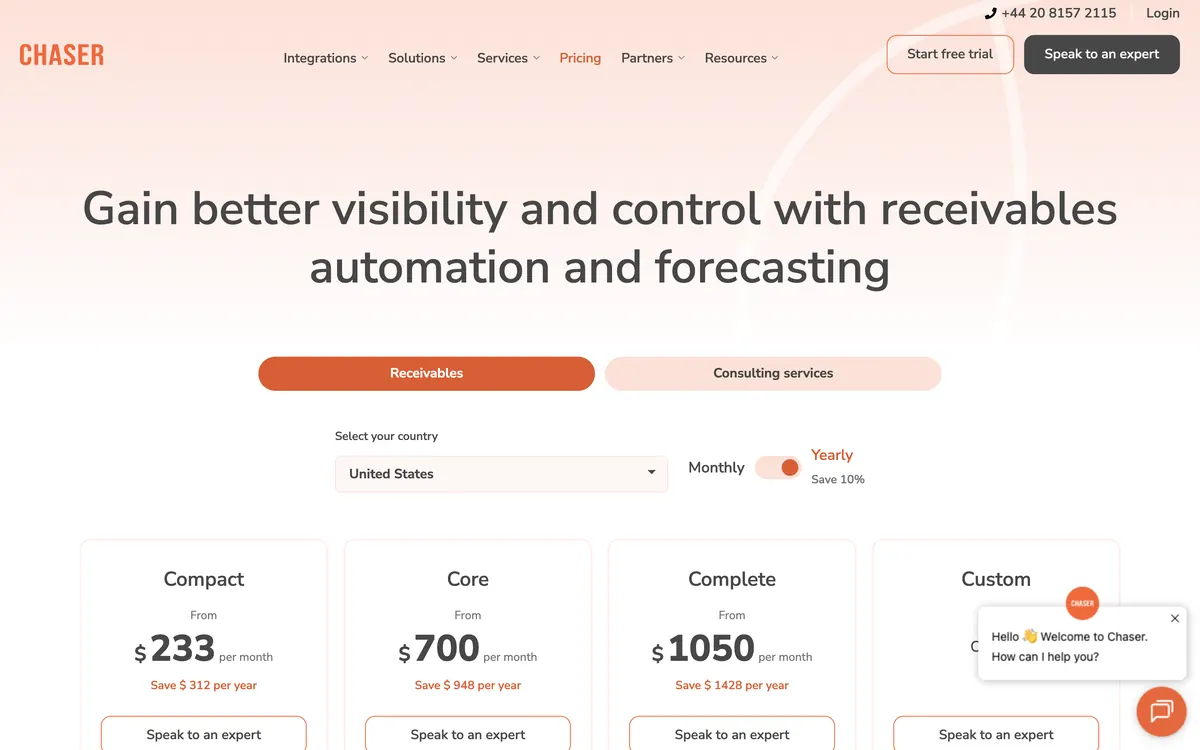
The schedule is the part to read carefully, and the section at the top of this page sets out exactly what the chasing does with it. Plans are also unavailable on the trial, Custom and Care tiers.
Limitations with Chaser. The chasing stays keyed to the original invoice due date rather than the installment dates, so the automation stops at the point the plan starts.
No fee is raised on a payment-plan or partially paid invoice, which means the fee engine and the plan cannot be used together. Compact stops at four users. The entry price is tiered by company turnover rather than by how many plans you run.
Best suited for: A finance team that wants to split one overdue invoice weekly through to yearly without leaving the tool that already chases it. Its chasing stays keyed to the original due date, and no fee is raised on a payment-plan invoice.
5. ezyCollect, best for ANZ installments collected by direct debit
ezyCollect is a collections platform with three plan shapes and direct debit behind them for Australian and New Zealand businesses, from a last-published A$275 a month on annual billing.
What is it best for?
Choose ezyCollect if you run an Australian or New Zealand business on MYOB or a mid-market ERP and want installments collected by direct debit rather than chased by email.
- Fits
- AU and NZ businesses on MYOB, Xero or a mid-market ERP. No revenue band is published; the tiers are set by debtor count, starting at 200
- Regions
- Founded in Sydney in 2014, acquired by Sidetrade in October 2025 and relaunched in July 2026. Core market is AU and NZ, with ACH available for US collection
- Entry cost
- A$275/mo on ezyStart for 200 debtors, 3 users and 1 workflow, plus a A$900 setup fee, on annual billing; monthly billing adds 20%. ezyGrow A$950, ezyScale A$2,350. Last published; ezyCollect now hides its pricing, request a quote.
- Rated
- 4.9 from 35 reviews on its Xero App Store listing; 4.7 from 25 on G2; 4.9 from 12 on Capterra
- Awards
- None found
- Runs on
- Xero, MYOB AccountRight, Exo, Essentials and Acumatica, QuickBooks Online, NetSuite, Dynamics, Sage 300 and Intacct, SAP Business One, Pronto Xi, Attaché, JCurve
- Late fees and interest
- None found. No late fee or interest mechanic appears in the help center or the relaunch material; card surcharging is the only charge the product adds
- Does best
- Three plan shapes, subscription, fixed amount and fixed count, with direct debit auto-collection behind them
- Customers
- Named on its website: Feral Brewing, Hampers with Bite and Skillinvest. Feral Brewing's case study reports overdue accounts cut by over 50%.
ezyCollect is the AU and NZ specialist, and since the Sidetrade acquisition it has been rebuilt around an order-to-cash platform rather than a chasing tool. Its payment plans come in three shapes: a subscription, a fixed amount per period, or a fixed number of installments, at weekly through monthly intervals.

The collection side is the reason to look at it. Auto-Collect takes each installment by direct debit rather than sending a link and hoping, and the portal carries card, Apple Pay, Google Pay, EFT and ACH alongside it. Cash application writes the receipt back to the ledger automatically.
Limitations with ezyCollect. Payment plans are a paid add-on rather than part of the base subscription. No late fee or interest function appears anywhere in the vendor's materials, so a plan that slips costs the customer nothing.
Pricing is annual-contract with a setup fee, and monthly billing adds 20%. Reminder workflows run at customer level rather than invoice level, and a customer who passes the end of a workflow receives no further automated follow-up.
Best suited for: An Australian or New Zealand business on MYOB or a mid-market ERP that wants installments collected by direct debit. Plans are a paid add-on, no late fee function appears, and pricing is an annual contract with a setup fee.
6. Kolleno, best for NetSuite or SAP teams whose workflow follows the plan
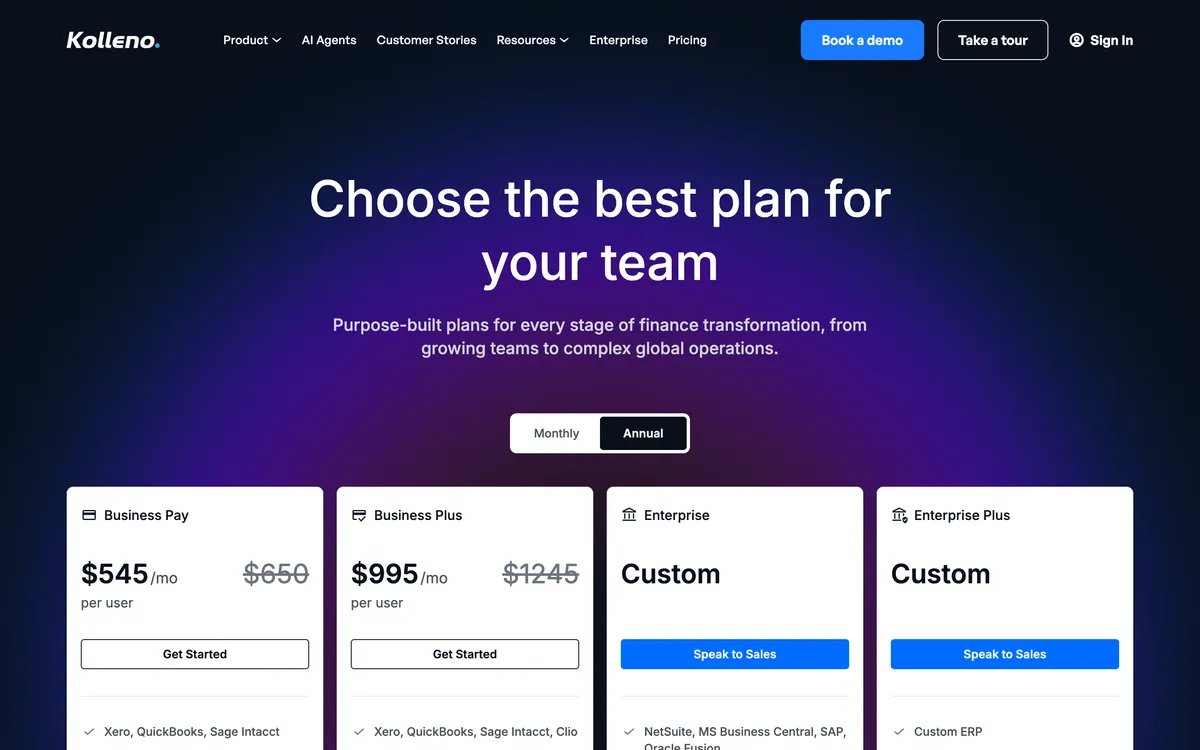
Kolleno is an order-to-cash platform for NetSuite or SAP teams, with automations attached to the plan, from $650 per user a month.
What is it best for?
Choose Kolleno if you run a NetSuite or SAP order-to-cash team and want a collections workflow to follow the plan rather than the original invoice date.
- Fits
- Order-to-cash teams: BusinessPay for turnover under £1m, Business Plus £1m to £100m, Enterprise £100m to £1bn
- Regions
- London head office, founded 2020, selling internationally
- Entry cost
- Minimum one user, for turnover under £1m: BusinessPay at $545 per user a month on annual billing or $650 monthly, then Business Plus at $1,245 per user.
- Rated
- 4.9 from 117 G2 reviews; 5.0 from 18 Xero App Store reviews; 5.0 from 8 on Capterra
- Awards
- G2 Best Software Awards 2024
- Runs on
- Xero and QuickBooks Online at the small-business end, then NetSuite, SAP S/4HANA and Business One, Sage Intacct, Dynamics 365, Workday, Oracle JD Edwards, Epicor, Infor, Odoo and Zuora
- Late fees and interest
- None found. No feature page or help article documents a late fee or interest calculation
- Does best
- Plan-linked automations, so a collections workflow can be attached to the schedule rather than to the original invoice date
- Customers
- Named on its website: Wise, Deel and Laundryheap. Laundryheap's case study reports 94% of payments collected on time.
Kolleno is an order-to-cash platform built around cash application, and its payment plan inherits that plumbing. An invoice is split weekly, monthly or bi-monthly, the portal holds saved payment methods for scheduled and recurring charges, and automations can be linked to the plan itself so the follow-up tracks the schedule.
Behind the plan sits the reconciliation Kolleno is built on: remittance emails parsed into suggested matches, BAI2, NACHA and ISO 20022 bank files, one-to-many matching, partial payments and credit-note offsets. A part-paid invoice on a plan is exactly the case that breaks naive cash application, and this is the tool built for it.
Limitations with Kolleno. $650 per user a month on BusinessPay, a tier for turnover under £1m that leaves out workflow automation, puts Kolleno above most small businesses, and the second tier nearly doubles it.
Uneven totals have to be split by hand, and a plan carries no interest, deposit or approval options. No late fee or interest function is documented anywhere in its materials. Reviewers name navigation and reporting depth as the recurring weak points.
Best suited for: A NetSuite or SAP order-to-cash team that wants the collections workflow to follow the plan dates and cash application to absorb part payments. It costs $650 per user a month, and a plan carries no deposit, interest or approval options.
What happens when installment 3 fails?
Most vendors document how a payment plan is created and almost none documents what happens on the morning an installment does not clear, which is the only part of the mechanism a controller ever has to handle personally.
| Tool | What pulls the installment | Retry on a failed pull | A charge on the miss | Where the failure surfaces |
|---|---|---|---|---|
| Paidnice | Stripe or Pinch Payments, against a stored mandate | Not published | The customer group's fee policy still applies; the invoice is still the invoice | Reminders and statements on the same customer group |
| Alternative Payments | Alternative Payments, on its own book | The vendor handles missed payments | Not applicable. You were funded in full upfront | With the financier, not with you |
| Biller Genie | The customer's own autopay enrollment | Failure handling is documented on autopay | Only through the Late Fee Manager add-on, on the invoice's 30-day clock | The portal and the reminder set the merchant already approved |
| Chaser | Nothing. The split is a schedule, not a collection | None found | No. No fee is raised on a payment-plan or partially paid invoice | The original invoice due date, which the chasing never left |
| ezyCollect | Auto-Collect direct debit | Not published | None found. No fee or interest mechanic anywhere in its materials | Cash application, where a receipt fails to write back |
| Kolleno | Saved payment methods on scheduled and recurring charges | Not published | None found | Automations linked to the plan, so the follow-up tracks the installment |
Four of the retry cells read Not published.
The failure path is the least documented part of every payment plan product in this category, which makes it a demo question rather than a comparison row. Ask the vendor to fail an installment in front of you, and watch three things: what the ledger shows, what the customer receives, and what reaches the controller.
Two behaviors are documented well enough to decide on now. Chaser will not raise a fee on a payment-plan or partially paid invoice at all, so starting a plan switches the fee engine off for that invoice and nothing accrues behind a plan that collapses.
Paidnice keeps the fee policy under the customer group, so an account moved onto a plan can be moved to a group with a softer rule while the rest of the ledger stays on the original one, and moved back if the plan fails.
What does a payment plan do to your ledger?
A payment plan takes one of three shapes on your ledger, and each does something different to your aged receivables report and to your tax point. No vendor demo raises this. Your accountant will, usually after the first plan has gone out.
- One invoice, split. The original stays on the ledger at its original date and value, and the installments are collections against it. Aged receivables keeps showing the full balance in its original bucket until each payment lands. Nothing moves on the tax point, because nothing about the invoice changed. This is what Chaser and Kolleno describe when they split one, and what Paidnice writes against the Xero or QuickBooks Online invoice.
- New invoices, one per installment. The original is credited or voided and replaced by several smaller documents with their own dates. The aged report looks healthier the same afternoon, which is both the attraction and the trap, and each new document carries its own tax point.
- Credit note and re-raise. The original is credited in full and a fresh document issued. This is the version that most often goes wrong at reconciliation, because the credit and the re-raise can land in different periods.
Settle the tax point before you start offering plans rather than afterwards. In a VAT jurisdiction the time of supply is generally fixed by the original invoice, so splitting the collection does not move VAT you have already declared; replacing that invoice with new ones can move it, and a credit note certainly does.
Under US sales tax the equivalent question is when the liability accrued and whether your state treats an installment arrangement as a change to the sale. Neither answer belongs to a software vendor.
Which ledgers carry a plan?
- Xero. All six connect. Chaser and Kolleno split an existing invoice on the same ledger, and Paidnice writes the plan against the Xero invoice itself.
- QuickBooks Online. All six connect. Paidnice, Chaser and Kolleno build the schedule for you; Biller Genie waits for the customer to ask for one.
- QuickBooks Desktop. Biller Genie through its separate connector, and Alternative Payments. Nothing else here reaches it.
- MYOB. ezyCollect natively across AccountRight, Exo, Essentials and Acumatica. Paidnice reaches MYOB on its Custom plan only, as a build.
- NetSuite, SAP and Sage Intacct. ezyCollect and Kolleno, with Alternative Payments and Chaser connecting to most of the list.
How do deposits, first payments and mandates work?
The first payment predicts the rest of a payment plan: a plan that opens with a deposit taken against a stored mandate behaves nothing like one that opens with a link and a promise.
Only Paidnice documents a deposit or down payment on a plan. Kolleno explicitly offers none, ezyCollect does not document deposit handling, and Chaser and Biller Genie show no evidence either way. Alternative Payments has no deposit because there is nothing to deposit against: the invoice is already settled in full.
Behind the deposit sits the mandate, and the rails decide what a mandate can be. Paidnice collects through Stripe or Pinch Payments. ezyCollect's Auto-Collect is a direct debit in Australia and New Zealand, where the pull is initiated by you rather than re-authorized by the customer each time.
Kolleno runs Stripe, Blink, Adyen and GoCardless. Biller Genie names gateways including USAePay, Authorize.Net and Elavon, and enrolls the customer in autopay with per-customer thresholds. Alternative Payments offers US ACH free to the payer, plus PAD and EFT in Canada.
Where no mandate can be stored, a plan is a series of requests, and the response rate on request four is not the response rate on request one.
How do a payment plan and a late fee interact?
Three of the six can charge for late payment at all, and what each does once a plan exists is the thing to check before you offer one. Biller Genie charges a recurring fee every 30 days, starting at 30 days past due, through an add-on.
Chaser runs one global rule that explicitly stands down on a payment-plan invoice. Paidnice runs fee and interest policies per customer group. Alternative Payments, ezyCollect and Kolleno document none.
This matters more here than the row in the table suggests. A plan is a concession, and a concession is only worth something where the alternative costs the customer money. Where the tool has no fee engine, the plan is the only lever on the desk and there is nothing to trade it against.
The three positions available, and what each one leaves you holding:
- A recurring fee every 30 days
- Biller Genie treats an invoice as late at 30 days past due, then recurs the charge on a 30-day schedule into a finance charge account. There is no interest calculation and nothing varies by customer
- A rule that stands down on a plan
- Chaser has four calculation types recalculated daily, but only one global rule, and no fee is raised on a payment-plan or partially paid invoice. Starting a plan turns the fee engine off for that invoice
- A fee that varies by group
- Paidnice raises two charge types on the same customer group, an invoice late fee and a statement interest charge, both posted to the ledger as Draft or Approved. Because policies sit under groups, a customer on a plan can be moved to a group whose rule is softer without switching the policy off for everyone else
Where the fee posts to the ledger it enters the customer's accounts payable system, their aged payables and their payment run, which is what makes it something you can waive deliberately, in writing, in exchange for the first installment clearing today.
What are pure-play plan tools outside the ledger?
Pure-play plan tools sell payment plans that never touch a ledger at all; buy now, pay later is covered in the risk section above.
These are the pure-play plan and deposit tools that sit outside accounting software entirely: Partial.ly, Paythen, PaySimple and Stripe Billing, with GoCardless as the direct debit specialist and Denefits selling financed, no-credit-check plans into healthcare and services.
None of those writes the plan against a ledger invoice, so a business whose receivables live in Xero, QuickBooks Online or an ERP reconciles two systems by hand. That is the trade for the flexibility they offer, and for some businesses it is worth making.
The five things to look for when you shortlist:
- The plan sits on the existing invoice: the receivable keeps its original date, tax treatment and aged position, rather than being voided and reissued as several small documents.
- A deposit and a schedule: an upfront amount followed by equal or custom installments, at an interval the customer can actually service.
- Auto-pay behind the schedule: a stored mandate that pulls each installment on its date, so nobody sends a link twelve times.
- Chasing keyed to the installment: a reminder about the installment that was missed, not about the original invoice due date.
- Cash application that survives partial payments: receipts matched back to the invoice and the ledger with no spreadsheet in the middle.
A last practical point: the plan has to survive contact with your cash application. Part payments against one invoice, credit-note offsets and bank files are where a plan quietly becomes a reconciliation job, which is why Kolleno's depth there is worth more on this page than its feature list suggests.
How much does payment plan software cost?
Published entry prices: Alternative Payments $199, Biller Genie $49.95 a month plus 0.50% of invoices collected (last reported by third-party listings; now hidden, request a quote), Paidnice $69, Chaser £199, ezyCollect A$275 (last published; now hidden, request a quote) on an annual contract, Kolleno $650 per user.
Read the meter, not the headline. Biller Genie and Alternative Payments charge against the money that moves, so the bill grows with revenue whether or not the tool is doing more work.
Kolleno charges per user, so a credit control desk of three multiplies the bill. Chaser charges by company turnover, so the price steps as the business grows rather than as the plan book grows.
Paidnice charges by invoice volume on a flat tier with no per-seat fee above Essentials. ezyCollect is the only one here with a setup fee, at A$900 on the entry tier, and its monthly billing option adds 20% over the annual price.
Two costs sit outside the subscription on all six. Payment processing is charged separately everywhere, and it is the fee the plan actually runs on, so a twelve-installment plan pays twelve transaction fees where a single settlement would have paid one.
Add-ons are the second: payment plans themselves are an add-on at Biller Genie, ACH is an add-on there too, and multi-entity is a per-entity add-on at Paidnice.
What does that mean at your size?
- Under $1m of turnover, the choice is Biller Genie or Paidnice. Biller Genie, last reported at $49.95 a month plus 0.50% (now hidden, request a quote), while the volume keeps the percentage small, or Paidnice at $69 to hold the plan and the fee policy on the same customer group.
- $1m to $4m. ezyCollect or Paidnice. ezyCollect's entry tier covers 200 debtors and pairs the plan with direct debit collection, at A$275 a month on an annual contract.
- $4m to $20m. Chaser for installments at any interval from weekly to yearly on a wide ledger list, at £199 on Compact and £599 on Core, or Paidnice for a plan written on the ledger invoice with a fee policy behind it.
- Above $20m. Kolleno, where the plan is attached to automations and cash application absorbs the partial payments it generates. Chaser's Complete tier where staying on one system matters more.
Which payment plan software fits your use case?
Start from how the plan has to run. Each row names the tool that fits that job on the facts above, and the catch to check first.
| Use case | Start with | Why | Watch out |
|---|---|---|---|
| Xero or QuickBooks Online, with the plan on the invoice and a fee policy behind it | Paidnice | Deposit, installments and auto-pay on the ledger invoice, from $69 a month | Native to Xero and QuickBooks Online only |
| A US business that wants to be paid in full now while the customer pays over time | Alternative Payments | Funds the invoice inside a day and carries the default, from $199 a month | The customer pays 3.0% to 7.0%; not available in Canada |
| A US small business on QuickBooks Desktop that wants customer-requested plans | Biller Genie | Portal requests, named gateways such as USAePay and a QuickBooks Desktop connector | Plans are a paid add-on; price now hidden, request a quote |
| Splitting one overdue invoice inside the tool that already chases it | Chaser | Any interval from weekly to yearly, from £199 a month | Chasing stays on the original due date |
| An Australian or New Zealand business that wants direct debit pulls | ezyCollect | Auto-Collect direct debit and native MYOB | Support switches plans on; annual contract plus setup fee |
| A NetSuite or SAP team with many part payments | Kolleno | Automations linked to the plan and deep cash application | $650 per user a month; no deposit option |
What do finance teams ask about payment plans?
What finance teams ask between the shortlist and the first plan going out: what the product actually is, what it costs, and what happens to a late fee once an invoice is on a schedule.
What is payment plan software?
Payment plan software is software that splits an invoice into a schedule of smaller payments and collects them on the dates they fall due, usually with a stored mandate so each installment is pulled rather than requested.
One version writes the plan against the invoice already on your ledger, so the receivable keeps its original date, tax treatment and aged position.
What is the best payment plan software?
The best payment plan software depends on where your invoices live. Choose Paidnice if you are on Xero or QuickBooks Online and want the plan set against the ledger invoice on the same customer group as the reminders and the fee policy, from $69 a month.
Choose Chaser to split one invoice at any interval from weekly to yearly, from £199 a month, or ezyCollect for direct debit collection in Australia and New Zealand.
Is payment plan software the same as buy now, pay later?
No. A payment plan is your own receivable, scheduled: you keep the credit risk and collect over time.
Buy now, pay later is a third party funding the purchase, paying you in full and carrying the risk, which is what Alternative Payments sells into B2B invoices.
Can I put a Xero or QuickBooks Online invoice on a payment plan?
Yes. Paidnice sets the plan against the Xero or QuickBooks Online invoice, with a deposit, installments and auto-pay, and collects through Stripe or Pinch Payments.
Chaser and Kolleno split an existing invoice on both ledgers, and Biller Genie handles it as a request the customer raises through the portal and the merchant approves.
Do late fees still apply once an invoice is on a payment plan?
That depends entirely on the tool: Chaser raises no late fee on a payment-plan or partially paid invoice at all.
Paidnice keeps its fee and interest policies under customer groups, so a customer on a plan can be moved to a group with a softer rule while everyone else stays on the original one. ezyCollect, Kolleno and Alternative Payments document no fee engine.
What does payment plan software cost?
Alternative Payments is $199 a month up to $50,000 processed, Paidnice is $69 a month, Chaser is £199 a month up to £4m turnover and Kolleno is $650 per user a month.
Biller Genie was last reported at $49.95 a month plus 0.50% of invoices collected, capped at $1,500, and ezyCollect at A$275 a month plus a A$900 setup fee; both are now hidden, so request a quote. Payment processing is charged separately on all six.
Does a payment plan hurt my DSO?
Yes, a payment plan lengthens DSO, and deliberately so. Report it against your write-off rate rather than against your target days, and keep plan balances visible as their own line in the aged report so the DSO movement can be attributed rather than argued about.
Related guides
Buyer's guide
Best accounts receivable software
The pillar guide by business size and accounting system.
Dunning
Best dunning software
Tools that recover failed payments and chase unpaid invoices.
Collections
Best debt collection software
What happens after chasing stops working, and what it costs.
Free tool
AR turnover ratio calculator
Score your collection speed against your industry benchmark.