Upflow vs Kolleno vs Paidnice: choose Paidnice if nobody in the business is a dedicated collector; choose Upflow or Kolleno if a finance team already collects. Kolleno bills per user from $650 a seat a month and bands its tiers by turnover, with BusinessPay under £1m. Each of the three meters its price differently.
Upflow bills on annual gross invoice value across five bands and is now quote-only (last reported at $440 for Grow and $880 for Scale in 2024). Paidnice bills on invoices raised a month, from $69 with no per-seat fee, and is the only one of the three that calculates and posts a late fee itself.
Upflow against Kolleno is analytics against reconciliation. Adding Paidnice changes the question from which platform to which meter, because the same $10m business pays a very different amount on each of the three.
- Choose Paidnice if nobody in the business is a dedicated collector and you want reminders, statements and a late fee posted to Xero or QuickBooks Online, from $69 a month.
- Choose Upflow if you run a SaaS or subscription finance team that wants countback DSO, collection effectiveness and at-risk reporting behind Stripe Billing, Chargebee or Zuora, with unlimited seats.
- Choose Kolleno if matching remittances and BAI2, NACHA or ISO 20022 bank files costs more hours than the chasing.
What accounts receivable software is (and what it is not)
Accounts receivable software runs the work between raising an invoice and banking the payment. All three tools here read open invoices from the ledger, send reminder workflows, run a branded customer portal and take card and bank payments.
Around that core each adds its own layer. Upflow adds receivables analytics, Kolleno adds cash application against bank files and remittances, and Paidnice adds late fees and statement interest posted to the ledger. Statements, payment plans, credit scores and escalation sit in some or all of the three.
What it is not:
- Not the ledger. Xero, QuickBooks Online, NetSuite or Sage Intacct holds the books. The tool connects to it and, at Paidnice, posts a fee back as a Draft or Approved invoice.
- Not the billing system. Upflow sits behind Stripe Billing, Chargebee or Zuora, and the invoice is still raised there.
- Not a collection agency. Escalation stays inside your own team: Kolleno escalates within its workflows, and Paidnice hands a phone call, stopped credit or a template legal letter to a named person.
- Not a credit bureau. Kolleno pulls bureau data through integrations, Paidnice runs native credit checks from payment behavior plus Creditsafe bureau checks through the API on the Custom plan, and Upflow scores risk without a bureau.
It sits between the ledger and the customer. It reads invoices and payments from the accounting system, works the overdue list, and writes payments, matches or charges back, so the ledger stays the record.
Three meters: seats, gross invoice value, invoice count
Kolleno reads how many people log in and how large the company is. Upflow reads the dollar value of the invoices you raise in a year. Paidnice reads how many invoices you raise in a month.
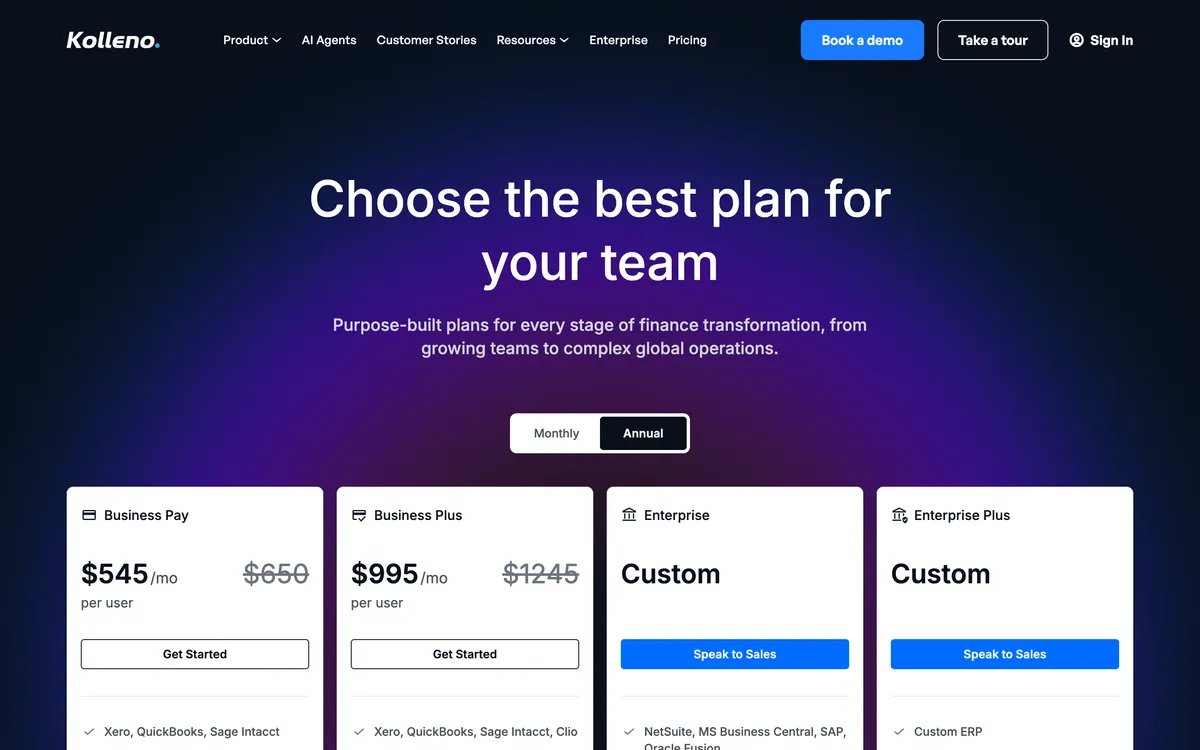
A per-seat meter rewards a small team and punishes a growing one. Kolleno’s BusinessPay tier is $650 a user a month, or $545 on annual billing, with a one-user minimum, for turnover under £1m and under 100 invoices, without workflow automation.
Business Plus is $1,245 a user, $995 annual, with a two-user minimum, for turnover from £1m to £100m. Enterprise starts at £100m turnover and is custom-priced. Check current pricing with the vendor.
A gross-invoice-value meter tracks revenue directly. Upflow’s five tiers run Starter to $10m, Grow to $25m, Scale to $50m, Accelerate to $100m and Enterprise above that, every one quote-only, with unlimited seats on all of them.
The last public prices, captured by third parties in 2024, were $440 a month for Grow and $880 for Scale. A Payments add-on is $390 a month on any tier.
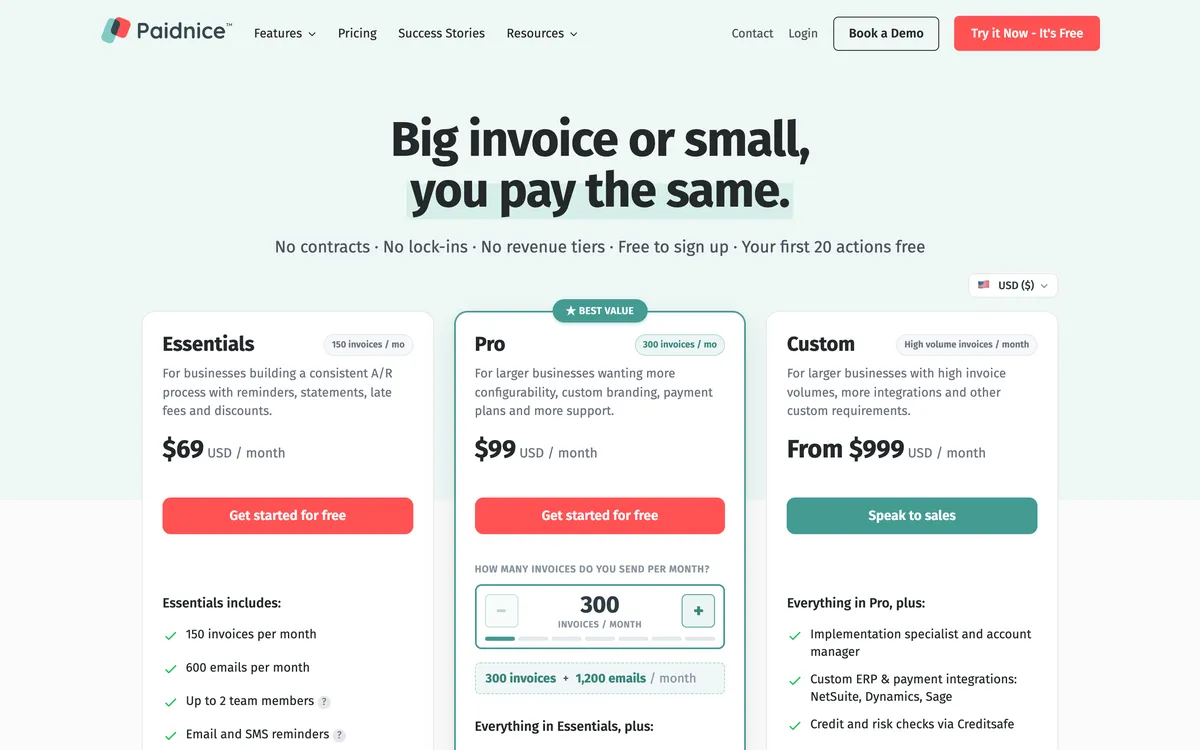
An invoice-count meter ignores both. Paidnice’s Essentials is $69 a month for 150 invoices and two team members; Pro runs from $99 at 300 invoices to $799 at 4,000, with unlimited users; Custom starts at $999, quoted for an ERP connection at any volume.
A $30m consultancy raising 200 large invoices a month and a $3m distributor raising 2,000 small ones land on opposite ends of that table, whatever their revenue.
Insight
Read side by side, the three pricing pages make the meter the decision. Kolleno and Upflow both make revenue the trigger for a price step, so a growing business pays more for the same work. Paidnice makes the invoice count the trigger, so a business that grows by winning larger contracts does not.
How do Upflow, Kolleno and Paidnice compare?
All three run reminder workflows, a branded customer portal and card and bank payments. What separates them is the meter, the seat model, which ledgers each reaches, whether the tool raises a late fee, and how deep the cash application goes.
 |
 |
 |
|
|---|---|---|---|
| Best for | Businesses without an AR team wanting late fees on the ledger | SaaS finance teams wanting analytics behind subscription billing | Teams where remittance and bank-file matching is the bottleneck |
| Revenue fit | Any size up to $50m a year, or 50,000 invoices a year | Five bands by annual gross invoice value, $10m and under on Starter, above $100m on Enterprise | Under £1m on BusinessPay, £1m to £100m on Business Plus, £100m to £1bn on Enterprise |
| From (monthly) | $69 | Last published at $440 Grow, $880 Scale; now quote-only | $650 per user, $545 on annual billing |
| Priced on | Invoice volume, no per-seat fee | Annual gross invoice value, quote only | Per user, tiers gated on turnover |
| Seats | Up to 2 on Essentials, unlimited on Pro and Custom | Unlimited on every tier | Minimum 1 on BusinessPay, 2 on Business Plus, 3 on Enterprise, 4 on Enterprise Plus, each one billed |
| Ledger integrations | Xero, QuickBooks Online. NetSuite, Sage Intacct, MYOB and Dynamics 365 Business Central on the Custom plan only | QuickBooks, NetSuite, Sage Intacct, Xero, Stripe Billing, Chargebee, Zuora | Xero, QuickBooks Online and Sage Intacct on the two lower tiers (one account); NetSuite, SAP, Dynamics 365, Oracle and others on Enterprise |
| Late fees and interest | Yes (per customer group, posted to the ledger) | Via the ERP only (NetSuite); no native calculation | None found |
| Reminder channels | Email from your own authenticated domain, SMS metered at $0.10 with two-way SMS and WhatsApp replies in the platform; in-app calls made by a person, recorded and transcribed | Email, SMS and letter auto-send; call and task as manual steps; automatic actions fire once a day, business days only | Email, SMS and calls; 400 to 600 SMS or calls bundled on Enterprise tiers |
| Statements | Yes (any schedule, consolidated parent accounts) | Portal PDF statement, no scheduled send | Yes (in the portal) |
| Payment plans | Yes (deposits, installments, auto-pay) | No (customer partial payments and promises to pay) | Yes (weekly, monthly or bi-monthly splits) |
| Portal | Yes | Yes | Yes |
| Cash application | Payments through Stripe and Pinch reconcile to the ledger; no bank-file matching found | Yes (auto-match with rules; agentic reconciliation including bank CSV upload) | Yes (remittance parsing, BAI2, NACHA, ISO 20022 bank files, FX and bank-fee handling) |
| Credit risk | Yes: native checks from payment behavior, plus Creditsafe via API on the Custom plan | Customer credit scoring and risk segmentation | AI credit scores, bureau integrations, auto-adjusting limits |
| AI | Advanced Reads customer replies, drafts answers and follow-up actions (like PO updates) for your approval; MCP server for Claude, ChatGPT and other agents | Advanced Collections and cash application agents, from suggest-only to autonomous (Scale plan and up) | Advanced Insights, Copilot drafts and an autonomous Agent, in every tier |
| Rated (source, count) | 5.0 (83, Xero App Store) | 4.8 (233, G2) | 4.9 (117, G2) |
| Capterra rating (count) | 4.9 (14) | 4.5 (15) | 5.0 (8) |
“Not documented” means the vendor does not document the capability. “Not published” means the vendor does not print a price. “None found” means no evidence either way. Prices are the vendor’s published or last-verified from-price.
What each tool costs at $2m, $10m and $30m of revenue
Kolleno steps on turnover and seats. Upflow steps on gross invoice value. Paidnice steps on invoice count. Run the same business through all three and the bills diverge by an order of magnitude.
The calculation uses annual billing where a vendor publishes it, and assumes an average invoice of roughly $1,200, so $2m of revenue is about 150 invoices a month, $10m about 700 and $30m about 2,000. Change the invoice size and only the Paidnice column moves.
Kolleno stays on Business Plus from £1m until £100m turnover, so in all three rows its bill is the seat count multiplied by $11,940 a year on annual billing.
Cost calculator
Run your own numbers through the three meters
Gross invoice value meter
$5,280 a year
Grow tier
$440 a month, last published price, unlimited seats
Per-seat meter
$23,880 a year
Business Plus tier
2 seats × $995 × 12, annual billing
Invoice count meter
$3,348 a year
Pro 1,000 plan
$279 a month, unlimited users
Each figure is shown in the currency the vendor prints, so the three are not converted to one currency. The seat meter prices BusinessPay under £1m of turnover and Business Plus from £1m to £100m, then moves to custom pricing. The gross invoice value meter prints no price; the two figures shown are Upflow's last published prices.
The table below is the same calculation at the three revenue points, with the calculator’s $10m preset as the middle row.
| Revenue and volume | Paidnice | Upflow | Kolleno (annual billing) |
|---|---|---|---|
| $2m, 150 invoices a month, 1 user | $828 a year (Essentials) | Starter, not published | $23,880 a year (2-seat minimum, Business Plus) |
| $10m, 700 invoices a month, 2 users | $3,348 a year (Pro 1,000) | Grow, not published (2024 capture $5,280 a year) | $23,880 a year (2 seats, Business Plus) |
| $30m, 2,000 invoices a month, 3 users | $5,868 a year (Pro 2,000) | Scale, not published (2024 capture $10,560 a year) | $35,820 a year (3 seats, Business Plus) |
Kolleno per-user prices in US dollars from the vendor’s pricing page. Upflow figures are its last published prices; the live page carries no price. Paidnice prices from its US price table.
The gap is the price of the team. Kolleno and Upflow assume the buyer has collectors, a controller and a cash application clerk who will each log in, and price for that.
Paidnice assumes the ledger owner is the whole department and prices for the invoices, not the people. The right meter is the one that matches the team the business actually has.
1. Paidnice
Best for: A Xero or QuickBooks Online business without a dedicated AR team that wants reminders, statements and an enforced late fee running from the ledger, any size up to $50m a year, or 50,000 invoices a year.
What is Paidnice best for?
For an owner, bookkeeper or finance manager who is the whole collections department, and wants the policy written once, applied to every customer group at once, and the consequence posted to the ledger without a seat to buy.
- Fits
- Businesses on Xero and QuickBooks Online of any size up to $50m a year, or 50,000 invoices a year, with or without a credit controller
- Regions
- United States, United Kingdom, Australia, New Zealand, Canada, South Africa; Auckland headquarters, founded 2022
- Entry cost
- $69 a month on Essentials for 150 invoices, 600 emails and up to two team members; Pro from $99 a month for 300 invoices with unlimited users, to $799 at 4,000; Custom from $999. No contracts or lock-ins.
- Rated
- 5.0 from 83 Xero App Store reviews; 4.9 from 14 on Capterra; 4.7 from 29 on Trustpilot · Xero App Store listing
- Awards
- Winner, New Zealand Small Business App of the Year, Xero Global App Awards 2026; 2025 Xero Global Small Business App of the Year
- Runs on
- Xero, QuickBooks Online, Stripe, Pinch Payments, CloudDepot, HubSpot, Pipedrive, Zapier. NetSuite, Sage Intacct, MYOB and Dynamics 365 Business Central on the Custom plan only
- Late fees and interest
- Yes. Flat, percentage and compounding charges, an invoice late fee and a statement interest charge on the same customer group, raised on the ledger as a Draft or Approved invoice
- Does best
- A separate fee and interest policy under each customer group, posted to Xero or QuickBooks Online so the charge enters the customer’s own payables
Paidnice is the one tool on this page that raises a charge itself. Two charge types are available on any customer group, an invoice late fee per overdue invoice and a statement interest charge on the whole overdue balance, and the charge lands on the ledger as a posted document.
Around it runs the ordinary ladder: email and SMS from your own authenticated domain, statements on any schedule, prompt payment discounts, payment plans, a payment portal and escalation through task workflows.
The vendor’s own claim is that customers have half as many late invoices in the first 30 days.
On inbound replies, Paidnice uses AI to read the reply, log a payment promise, spot a PO request and draft the answer; a person approves each drafted reply before it sends unless that action type is pre-approved. Customers can also query an invoice or submit a promise to pay from the portal, and policies pause while a query is open. It also lists an MCP server on Pro and Custom plans, which lets Claude or ChatGPT read its contacts, invoices and replies.
Limitations with Paidnice. There is no bank-file cash application. Posted letters are on Pro and up, on request, at $2.00 a letter.
It is native to Xero and QuickBooks Online only; NetSuite, Sage Intacct, MYOB and Dynamics 365 Business Central are Custom-plan builds. The entry tier covers two team members. One Capterra reviewer found setup “still a bit clunky and not intuitive enough”.
Best suited for: A business on Xero or QuickBooks Online without a dedicated AR team that wants reminders, statements and a late fee posted to the ledger. The drawback is that it has no bank-file cash application.
2. Upflow
Best for: A SaaS or subscription finance team that wants the deepest receivables analytics and does not need the tool to raise a fee.
What is Upflow best for?
For a finance leader who wants countback DSO, collection effectiveness and at-risk rate on a customizable dashboard, with workflows that already sit behind a billing system such as Stripe Billing, Chargebee or Zuora.
- Fits
- Businesses with an AR or finance team, from $10m and under on Starter to above $100m on Enterprise, by annual gross invoice value
- Regions
- Headquartered in New York, founded in Paris; the vendor claims 500 or more customers in more than 30 countries
- Entry cost
- Not published. All five tiers are quote-only with unlimited seats; last published prices were $440 a month for Grow and $880 for Scale; Payments add-on $390 a month plus processing.
- Rated
- 4.8 from 233 G2 reviews; 4.5 from 15 on Capterra; 5.0 from 1 on the Xero App Store · Xero App Store listing
- Awards
- None found
- Runs on
- QuickBooks, NetSuite, Sage Intacct, Xero, Stripe Billing, Chargebee, Zuora, Stripe; Salesforce, Slack and Zapier cited; open API
- Late fees and interest
- Partial. Applied through the ERP only, documented for NetSuite; no native calculation
- Does best
- Receivables analytics: countback DSO against best possible DSO, CEI, at-risk rate over 90 days, aging and collection rate on customizable, exportable dashboards
Upflow calls its category financial relationship management, and the reporting layer is its strongest asset: dashboards that filter by workflow, country, account manager and custom field, export to CSV or Excel and go out by scheduled email. Workflows combine email, SMS, letter, call and task steps, timed to invoice age and customer risk profile.
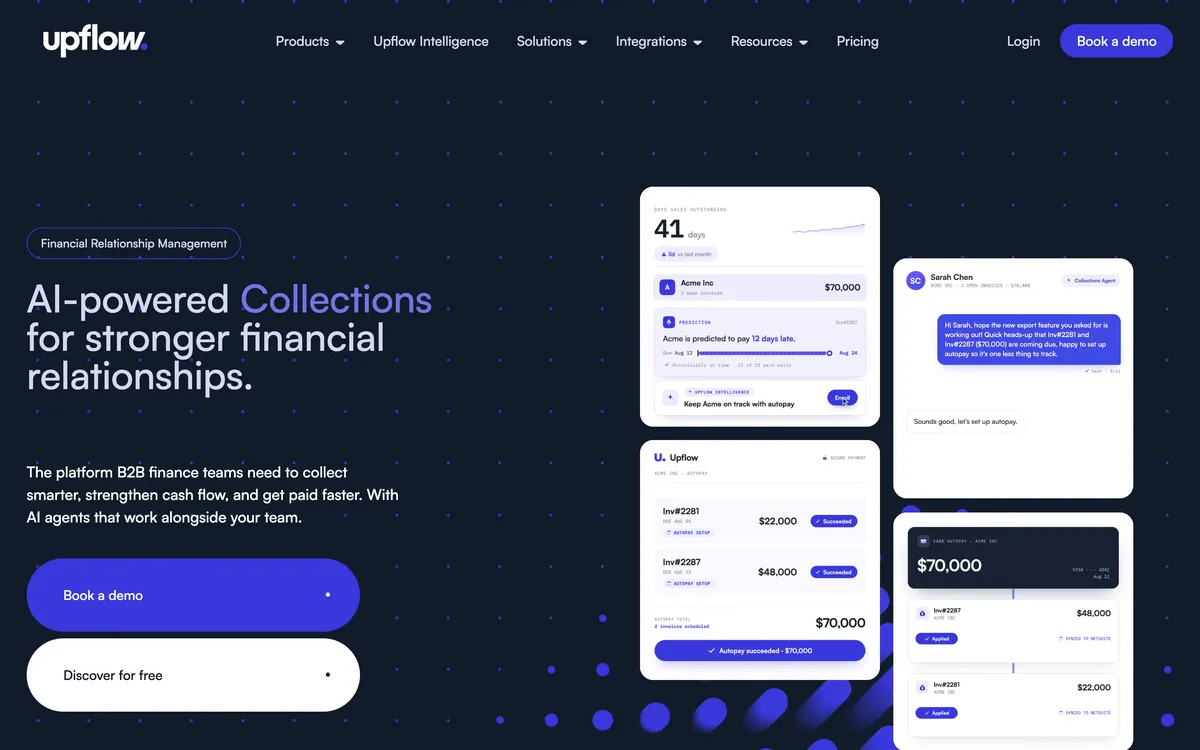
Recent releases add promise-to-pay detection, dispute-signal detection and an agentic cash application that matches from bank CSV uploads. Customers pay by ACH, card or direct debit, set up Autopay and raise disputes in the branded portal.
Limitations with Upflow. There is no price on the site: Grow was last reported at $440 a month and Scale at $880 in 2024, now hidden, request a quote. Automatic actions fire once a day, business days only. Own-SMTP sending switches off tracking.
The QuickBooks connection polls every five minutes and lands payments in Undeposited Funds. No native late fee, no payment plans beyond customer partial payments, and statements are a portal PDF with no scheduled send.
Best suited for: A SaaS or subscription finance team that wants countback DSO, collection effectiveness and at-risk reporting behind Stripe Billing, Chargebee or Zuora. The drawback is that every tier is quote-only, with no native late fee, no payment plans and no scheduled statements.
3. Kolleno
Best for: A finance team with an order-to-cash problem, where matching remittances and bank files costs more hours than the chasing does, on Business Plus at two or more seats.
What is Kolleno best for?
For a controller who receives BAI2, NACHA or ISO 20022 bank files and emailed remittances every morning and wants the matching, the credit-note offsets and the FX differences handled before anybody chases.
- Fits
- Businesses with an AR team: BusinessPay under £1m turnover, Business Plus £1m to £100m, Enterprise £100m to £1bn
- Regions
- London, founded 2020; sells internationally with named customers in the US and Europe; pricing displays in local currency by location
- Entry cost
- $650 per user a month on BusinessPay, $545 on annual billing, one-user minimum; Business Plus $1,245 per user, $995 annual, two-user minimum; Enterprise and Enterprise Plus custom.
- Rated
- 4.9 from 117 G2 reviews; 5.0 from 8 on Capterra; 5.0 from 18 on the Xero App Store · Xero App Store listing
- Awards
- G2 Best Software Awards 2024
- Runs on
- Xero, QuickBooks Online and Sage Intacct on the two lower tiers; NetSuite (native SuiteApp), SAP S/4HANA and Business One, Dynamics 365, Workday, Oracle JDE, Epicor, Infor, Odoo, Zuora on Enterprise; Salesforce, ServiceNow, Clio; open API
- Late fees and interest
- None found. No feature page or help article describes a late fee or interest calculation
- Does best
- Cash application: remittance parsing, SFTP bank connections, bank-file formats, match scoring, one-to-many and partial matches, credit-note offsets, FX and bank-fee journals including NetSuite multi-currency
Kolleno describes itself as an intelligent order-to-cash platform and has moved upmarket from small-business credit control to enterprise AR. Workflows fire on invoice created, ERP payment, email bounce or file upload, with conditional branches and auto-escalation. Credit scores update continuously, with bureau integrations and limits that adjust themselves.
Three AI layers ship on every subscription: Insights for payment likelihood, Copilot for next-best actions and drafted messages, and Agent for autonomous collections and reconciliation. Reviewers on G2 credit the workflows with visible collection gains within the first weeks.
Limitations with Kolleno. Every login is a billed seat, and the tiers are gated on turnover, so growth and headcount both move the bill. Xero and QuickBooks Online are limited to one connected account on the two lower tiers.
No late fee or interest capability was found in the product materials. Letters and calls are not workflow actions. Reviewers mention hard-to-find navigation and a basic mobile app.
Best suited for: A finance team whose remittance and bank-file matching costs more hours than the chasing, on Business Plus at two or more seats. The drawback is that every login is a billed seat, the tiers step on turnover and no late fee capability was found.
What does Upflow offer for accounts receivable?
Upflow’s receivables features are strongest where the data is read and weakest where the invoice is enforced: the analytics are the deepest of the three, and the fee and the plan are not there.
Four features define the product, and the fourth is the one Upflow leads with.
- Reminders. Multi-step workflows across email, SMS, letter, call and task; only email, SMS and letter send automatically, once a day on business days, so a Friday-evening overdue is first touched on Monday. Own-SMTP sending disables open and click tracking.
- Cash application and credit. Rule-based auto-matching, with an agentic version that reconciles from bank CSV uploads; disputes tracked and surfaced; a customer credit score and risk segmentation without a bureau.
- Fees, plans and statements. Late fees only as an ERP-side action documented for NetSuite; Upflow computes nothing itself. No payment plans, only customer partial payments and promises to pay. Statements are a PDF the customer downloads from the portal, with no scheduled send.
- Reporting. Countback DSO against best possible DSO, collection effectiveness index, at-risk rate above 90 days, aging and collection rate, on filterable, exportable, scheduled dashboards, plus billing-cohort cash forecasting.
The QuickBooks integration is one-way, polled every five minutes, with three text-only custom fields, and G2 reviewers rate the product 4.8 from 233 reviews.
What does Kolleno offer for accounts receivable?
Kolleno’s receivables features are strongest after the money arrives: the matching, the deductions and the journals. The chasing is competent and the fee is absent.
The feature set is built around the controller’s morning, and the second item is the one the price is paying for.
- Reminders and plans. Trigger-based workflows on invoice created, ERP payment, email bounce or file upload, with conditional branches, run-hour restrictions and automatic escalation across email, SMS and calls. Letters and calls are not workflow actions. Payment plans split weekly, monthly or bi-monthly, without interest, deposit or approval options.
- Cash application. Emailed remittances parsed into suggested matches; SFTP bank connections; BAI2, NACHA and ISO 20022 imports; one-to-many and partial matches, credit-note offsets, FX differences and bank fees, including NetSuite multi-currency journals. Deductions classified by reason code and ranked by AI.
- Credit risk and portal. Continuously updated AI credit scores, bureau integrations, real-time alerts and self-adjusting limits. The portal holds saved payment methods, scheduled payments, credit notes, statements and disputes on Stripe, Blink, Adyen or GoCardless rails.
- Reporting. DSO, live dashboards and cash-flow forecasting; reviewers ask for more customization.
No late fee or interest capability was found in any Kolleno feature page or help article, and on the two lower tiers Xero, QuickBooks Online and Sage Intacct connect one account each.
What does Paidnice offer for accounts receivable, and at what price?
Paidnice prices on invoices raised a month, from $69, with no per-seat fee, and its receivables features center on one thing the other two do not do: the fee is calculated and posted to the ledger.
| Plan | Invoices a month | USD a month | Users |
|---|---|---|---|
| Essentials | 150 | $69 | Up to 2 |
| Pro 300 | 300 | $99 | Unlimited |
| Pro 600 | 600 | $179 | Unlimited |
| Pro 1,000 | 1,000 | $279 | Unlimited |
| Pro 2,000 | 2,000 | $489 | Unlimited |
| Pro 4,000 | 4,000 | $799 | Unlimited |
| Custom | 4,000 and above | From $999 | Unlimited |
Further Xero organisations or QuickBooks Online companies are $29 a month each; SMS is $0.10 a message. Prices from the vendor’s US price table.
Every plan carries the same four feature groups; the plan changes the invoice allowance and the seat cap.
- Late fees and interest. Policies sit under customer groups, so a wholesale group and a retail group run different rates at once, and a single disputed invoice is excluded by its reference. Statement interest is a rate per annum or a percentage of the balance, compounds by default, nets against credit and recalculates when the statement sends. The charge is raised as a Draft or Approved invoice in the ledger.
- Reminders and statements. Email and SMS from your own verified domain, with sender profiles per policy so accounts@ chases on the due date and a director’s address takes over at 21 days. Statements on any schedule, including consolidated parent and child accounts.
- Payments and escalation. Payment plans with deposits, installments and auto-pay through Stripe or Pinch Payments. Escalations trigger on days overdue, amount, total balance or a credit-limit breach, and hand a phone call, stop credit or template legal letter to a named person.
- Reporting. A dashboard with DSO, overdue, average overdue age, on-time percentage and slowest payers; three exportable reports; expected-payment and cohort forecasting on every plan; a credit score from 0 to 100 on every contact. No bank-file cash application; Creditsafe bureau checks through the API on the Custom plan.
Verified reviews stand at 5.0 from 83 on the Xero App Store, 4.9 from 14 on Capterra and 4.7 from 29 on Trustpilot.
Insight
Across the three feature sets, Upflow and Kolleno treat the overdue invoice as something to be reported on and matched when it pays, and Paidnice treats it as something to be charged for. A business with a team to do the first job will not miss the second. A business without one usually needs the second more.
Which accounts receivable software fits your use case?
Pick the row that describes your team and ledger. Each names the tool on this page that fits that case and the reason from the sections above.
| Use case | Start with | Why |
|---|---|---|
| No dedicated collector; the owner or bookkeeper runs receivables | Paidnice | The policy is set once and runs, with no seats to buy, from $69 a month |
| A SaaS finance team reporting DSO and collection effectiveness | Upflow | The deepest analytics of the three, behind Stripe Billing, Chargebee or Zuora, with unlimited seats |
| Bank files and emailed remittances to match every morning | Kolleno | BAI2, NACHA and ISO 20022 imports, remittance parsing, and FX and bank-fee journals |
| Late fees or statement interest per customer group | Paidnice | The only one of the three that calculates the charge and posts it to Xero or QuickBooks Online |
| A NetSuite ledger | Upflow or Kolleno | Upflow lists NetSuite on every tier and Kolleno ships a native SuiteApp on Enterprise; Paidnice reaches it only as a Custom build |
| Payment plans for customers who cannot pay in one go | Kolleno or Paidnice | Kolleno splits weekly, monthly or bi-monthly; Paidnice adds deposits and auto-pay; Upflow has none |
What buyers ask when they have shortlisted exactly these three
The questions that come up once a US finance team has narrowed the list to this trio and has to explain the difference to whoever signs the budget.
Is Upflow or Kolleno cheaper?
Kolleno publishes a price and Upflow does not, so the only comparison available is Kolleno’s $650 a user a month ($545 annual) against Upflow's last published $440 and $880 a month. Both are priced for a team. Paidnice starts at $69 a month for the whole business.
Does Upflow or Kolleno charge a late fee?
Upflow applies one only through the ERP, documented for NetSuite, and calculates nothing itself. No late fee or interest capability was found for Kolleno. Paidnice calculates an invoice late fee and statement interest per customer group and posts the charge to Xero or QuickBooks Online.
Which one works without a dedicated AR person?
Paidnice is designed for that case: the policy is set once and runs, and there are no seats to buy. Upflow and Kolleno assume collectors and a controller will log in daily, and Kolleno bills for each of them.
Which of the three fits a NetSuite ledger?
Upflow lists NetSuite on every tier and Kolleno ships a native SuiteApp on its Enterprise tiers. Paidnice reaches NetSuite only on its Custom plan as a build, from $999 a month. If NetSuite is the ledger, the first two are the shortlist.
Does Paidnice do cash application?
Only for payments taken through Stripe or Pinch Payments, which reconcile back to the ledger. There is no bank-file matching, no remittance parsing and no BAI2, NACHA or ISO 20022 import, which is the job Kolleno is bought for.
Why is Kolleno priced in US dollars here?
The vendor’s pricing page displays currency by location, and this page quotes its published US dollar prices. Confirm the billing currency with the vendor before budgeting.
Does either vendor offer a free trial?
Upflow’s live pricing page shows five quote-only tiers and no trial; its pricing FAQ mentions a free Discover plan for analytics, but it is not among the plan cards. Kolleno publishes no trial. Paidnice has no timed trial either; signing up is free, the first 20 actions are free and no card is required.
Related comparisons for a US finance team
Comparison
Kolleno vs Upflow
The two-way comparison on analytics, reconciliation and price.
Alternatives
Best Upflow alternatives
Upflow alternatives on enforcement, price and verified reviews.
Alternatives
Best Kolleno alternatives
Kolleno alternatives on enforcement, price and verified reviews.
Buyer's guide
Best AR software for QuickBooks Online
Compared for a QuickBooks Online ledger by business size and price.
Sources
9 sources, checked by Julie Turnbridge on October 26, 2026
- Xero App Store apps.xero.com/us/app/paidnice
- Capterra capterra.com/p/254868/Paidnice
- Trustpilot trustpilot.com/review/paidnice.com
- G2 g2.com/products/upflow-upflow/reviews
- Capterra capterra.com/p/193097/Upflow
- Xero App Store listing apps.xero.com/uk/app/upflow
- G2 g2.com/products/kolleno/reviews
- Capterra capterra.com/p/227932/Kolleno
- Xero App Store listing apps.xero.com/uk/app/kolleno