The best accounts receivable software for law firms in 2026 is Paidnice, for a firm whose practice system posts to Xero or QuickBooks Online and that charges interest on commercial bills but not on family-law bills. Bill.com, Chaser, Invoiced, Kolleno and Upflow complete the six.
| Tool | Fits |
|---|---|
| Paidnice | A firm on Clio, MyCase, CosmoLex or LeanLaw posting to Xero or QuickBooks Online that charges interest on commercial bills but not on family-law bills |
| Bill.com | A firm already paying vendors through Bill.com that wants three reminder emails and ACH collection in the same login |
| Chaser | An established firm with a billing team that wants email, SMS, letters, calls and Creditsafe checks on commercial clients, up to £4m turnover on the entry tier |
| Invoiced | A mid-market firm on NetSuite, Sage Intacct or Business Central evaluating an enterprise invoice-to-cash platform |
| Kolleno | A firm with a billing team that wants cash application, an AI collections agent and a listed Clio integration, priced per user |
| Upflow | A firm with a finance lead who wants collections analytics and cash forecasting more than late fees |
Lockup is days of annual revenue sitting in unpaid bills; Clio puts top-quartile firms at 19 days or fewer and bottom-quartile firms above 90. Clio Legal Trends · Intuit 2026 Late Payments Report
What is accounts receivable software for law firms, and what is it not?
Accounts receivable software for a law firm chases the operating invoice after the practice system has issued it. It reads the bill from the Xero or QuickBooks Online ledger the practice system posts to, then runs the follow-up until the client pays.
- Reminders and statements. Sequenced chasing by email, SMS, letters or calls, and statements on a cycle the firm controls.
- Interest and late fees. Paidnice and Chaser compute the charge and post it to the ledger, where the engagement letter and the bill allow it.
- Payment plans and a portal. Installments on an operating invoice, and a page where the client pays by card or ACH.
- Escalation. Instructions to a named person at a set number of days overdue, or a handoff to a collections partner.
It is not the practice system. Clio, MyCase, CosmoLex and LeanLaw keep the matter, the time, the bill and the trust ledger, and none of the six replaces them.
It is not trust accounting: client trust money stays in the practice system and is never commingled or debited. It is not a collections agency either. Chaser can hand an account to Debitura.
How this list was put together
This list helps a law firm choose software that chases operating invoices from its Xero or QuickBooks Online ledger without touching trust money.
| What we checked | Where the evidence came from |
|---|---|
| Trust-account handling: the tool chases operating invoices only, and client trust funds stay in the practice system | Vendor documentation on what each tool reads and writes, set against the trust rules covered on this page |
| Layers on Xero or QuickBooks Online | Vendor integration pages |
| Late fees and interest on legal bills | Vendor help pages |
| Legal-system integration with Clio, MyCase, CosmoLex or LeanLaw | Vendor integration listings |
| Published from-price | Vendor pricing pages, with "Not published" where there is none |
| Rating and review count | The Xero App Store or G2 |
What must AR automation never touch in a law firm?
Any AR tool a law firm adds must chase operating invoices only.
Clio keeps client funds separate from operating funds "in compliance with trust accounting and IOLTA regulations," protected from third-party debiting including processing fees and chargebacks. LeanLaw states that client funds must never be commingled and that each state sets its own IOLTA rules. CosmoLex adds that card processing fees cannot be taken from client accounts.
- Xero and trust
- Xero integrates with Actionstep, Clio Manage, LEAP and Smokeball but describes itself as not designed for tracking client trust funds. Trust stays in the legal layer
- QuickBooks Online and trust
- Not preconfigured for trust accounting; the IOLTA structure is built manually or through a legal layer such as LeanLaw, with monthly three-way reconciliation under state bar rules
- Fees on legal bills
- ABA Model Rule 1.5 requires reasonable fees, generally in writing, with unearned advances held in trust. Interest on overdue invoices is set state by state. ABA, Family Advocate, Winter 2026
- Collections agencies
- The FDCPA governs third-party collection of consumer debt only. An agency chasing an individual client is covered; a business client is not. CFPB
Which accounts receivable tools work for law firms?
Paidnice and Chaser suit a firm that wants interest charged on overdue bills, because they compute and post late fees themselves.
 |
 |
 |
 |
 |
 |
|
|---|---|---|---|---|---|---|
| Best for | Firm on Xero or QuickBooks Online wanting interest by client group | Firm already paying vendors through Bill.com | Established firm with a billing team wanting multi-channel chasing | Larger firm on an ERP evaluating enterprise invoice-to-cash | Large legal group wanting AI collections agents and remittance matching | Multi-office firm with a controller wanting DSO dashboards |
| Revenue fit | Any size up to $50m a year, or 50,000 invoices a year | Not published | £4m and under on the entry tier, tiers to £100m | Not published | Under £1m on BusinessPay, tiers to £1bn and above | Gross invoice value bands, under $10m to over $100m |
| From (monthly) | $69 | $49 per user | £199 | Not published | $650 per user | Not published |
| Layers on Xero or QuickBooks Online | Yes, both | Two-way from the Team tier; CSV only on Essentials | Yes, both | Yes, integration pages maintained | Yes, both on the two lower tiers | Yes, both (QuickBooks polled every 5 minutes) |
| Late fees and interest | Yes (per client group, posted to the ledger) | No | Yes (one set of rules for the account) | Not documented | None found | ERP-side only |
| Reminder channels | Email, SMS; in-app calls by a person | Email; max 3 templates company-wide | Email, SMS, letters, calls | Not documented | Email, SMS, calls | Email, SMS, letters; once daily, weekdays |
| Statements | Yes, scheduled, incl. consolidated parent accounts | No | Yes, monthly on a fixed day | Not documented | Yes, in the portal | Portal PDF statement, no scheduled send |
| Payment plans | Yes | No | Yes (chasing follows the invoice date) | Not documented | Yes | No (promises to pay only) |
| Legal-system integration | None named; via the ledger | None named; via the ledger | None named; via the ledger | None named; via the ledger | Clio listed among CRM integrations | None named; via the ledger |
| AI | Advanced Reads customer replies, drafts answers and follow-up actions (like PO updates) for your approval; MCP server for Claude, ChatGPT and other agents | None No AI in receivables (its AI agents are for payables) | None No AI features | Advanced Agentic AI (Assist, Automate, Advise) and CashMatch AI matching | Advanced Insights, Copilot drafts and an autonomous Agent, in every tier | Advanced Collections and cash application agents, from suggest-only to autonomous (Scale plan and up) |
| Rated | 5.0, 83 Xero App Store reviews | 4.4, 1,806 G2 reviews | 4.98, 374 Xero App Store reviews | Not documented | 4.9, 117 G2 reviews | 4.8, 233 G2 reviews |
"Not documented" means the vendor does not document the capability. "Not published" means the vendor does not print a price. "None found" means no evidence either way.
The six tools in five checked facts
- Four of the six print a monthly price: BILL from US$49 per user, Paidnice from US$69, Chaser from US$259 and Kolleno from US$650. Invoiced and Upflow do not print a price.
- Published prices grow with: users (BILL and Kolleno), invoice volume (Paidnice) and revenue band (Chaser).
- Two of the six apply a late fee themselves: Paidnice (per customer group) and Chaser (one rule).
- All six connect to both Xero and QuickBooks Online.
- AI that handles collections work or customer replies: Paidnice, Upflow, Kolleno and Invoiced. No AI in receivables: Chaser and BILL.
We checked each tool's own pricing, integration and help pages on October 26, 2026. "None found" in the data means the vendor's pages do not show the feature.
1. Paidnice, best for practice-system billing
Best for: Firms whose practice system already issues the bill.
Paidnice is a reminder, late fee and interest tool for firms that post to Xero or QuickBooks Online, of any size up to $50m a year, from $69 a month on Essentials.
What is Paidnice best for?
Choose Paidnice if your practice system already issues the bill and you want reminders, statements and interest to run from the operating ledger, with different rules for different client groups.
- Fits
- Firms on Xero or QuickBooks Online of any size, up to $50m a year or 50,000 invoices a year
- Regions
- United States, Canada, United Kingdom, Australia, New Zealand, South Africa
- Entry cost
- $69/mo on Essentials, 150 invoices, 600 emails, up to 2 team members; Pro from $99/mo with unlimited users and no per-seat fee.
- Rated
- 5.0 from 83 Xero App Store reviews; 4.9 from 14 on Capterra; 4.7 from 29 on Trustpilot
- Awards
- Winner, New Zealand Small Business App of the Year, Xero Global App Awards 2026; 2025 Xero Global Small Business App of the Year
- Runs on
- Xero, QuickBooks Online, Stripe, Pinch Payments, HubSpot, Pipedrive, Zapier. NetSuite, Sage Intacct and Dynamics 365 Business Central on the Custom plan only
- Statutory late fees
- Yes. An invoice late fee per overdue bill and a statement interest charge per client on the whole overdue balance, both raised on the ledger as Draft or Approved, with policies under client groups
- Does best
- Chasing the operating invoice from the ledger while the practice system keeps the matter, the time and the trust ledger
Paidnice reads the invoices the practice system posts into Xero or QuickBooks Online and runs the follow-up from there: reminder sequences per client group by email and SMS, scheduled statements including consolidated statements for a parent company with several matters, payment plans, and a client payment portal.
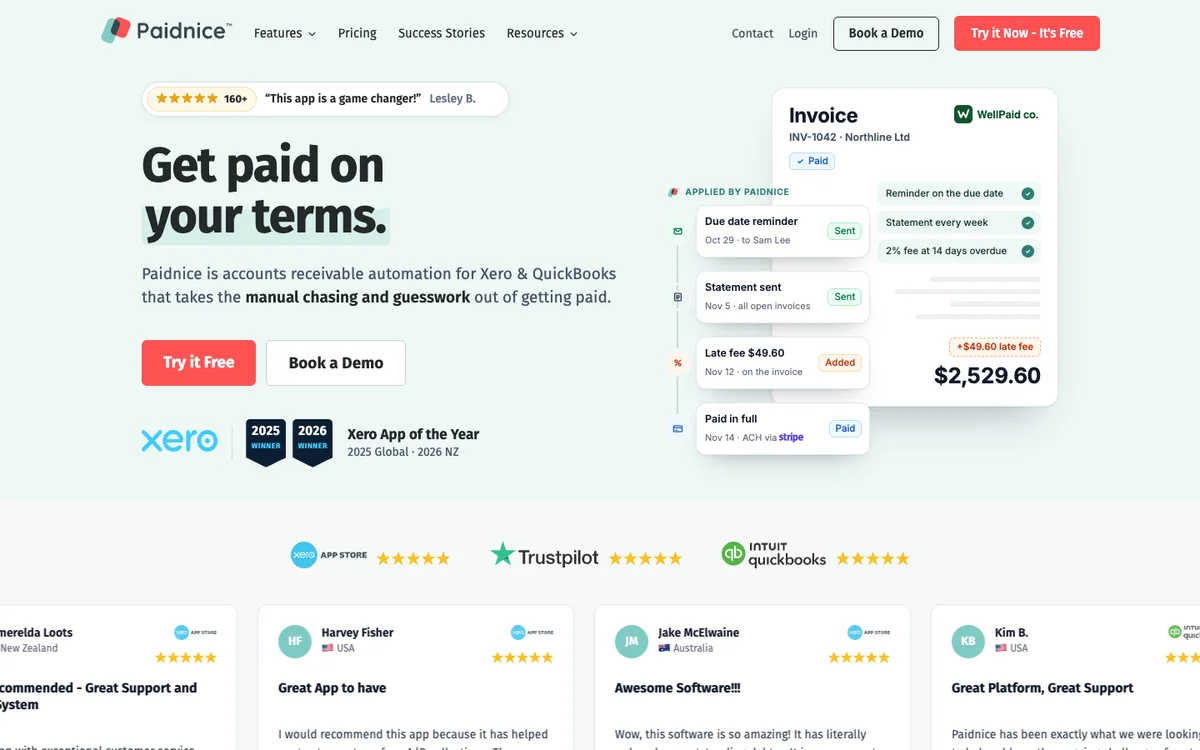
It can send the invoice document already attached to the ledger record, so the client sees the bill the firm's own system produced.
Paidnice calculates the late fee or interest on each overdue operating invoice under its client group's policy and raises it on the Xero or QuickBooks Online ledger as a Draft or Approved invoice.
A firm that states interest on commercial bills but not on family-law bills runs an interest policy on the first group and none on the second. A disputed bill is excluded by its reference without switching the client off.
Escalations fire at a set number of days overdue or on a client's total overdue balance, with instructions emailed to a named person. Paidnice reports that customers have half as many late invoices in the first 30 days.
Limitations with Paidnice. No legal-specific integration and no trust-accounting awareness: the firm keeps trust transactions off the operating ledger it reads, and nothing in Paidnice checks that for you.
- Xero and QuickBooks Online only; a practice system posting to Sage or NetSuite needs the Custom plan.
- Capterra reviewers describe the interface as "still a bit clunky and not intuitive enough" at setup.
Best Accounts Receivable Software for Law Firms: 6 Tools Compared (1:51)
Video chapters and transcript
- 0:00 Short answer
- 0:22 What matters for a law firm
- 0:46 Six tools, in alphabetical order
- 1:24 Published entry prices
Which accounts receivable software suits a law firm? It depends on what the firm needs. None of these six tools replaces the practice system.
They sit on the Xero or QuickBooks Online ledger and take over once an operating invoice falls overdue. Each one is compared on trust money, interest by client group, published price and reviews. Start with trust.
A tool must chase operating invoices only. Client trust funds are never commingled with firm money, and never debited for fees, chargebacks or interest. Interest on overdue bills is set state by state, and a firm may state it on commercial bills but not on family law bills.
The FDCPA covers consumer debt only, not business clients. Choose Bill.com if you already pay vendors through it and want three reminder emails and ACH collection in the same login. Choose Chaser if a billing team wants email, SMS, letters, calls and credit checks.
Choose Invoiced if you run NetSuite, Sage Intacct or Business Central and want an enterprise invoice-to-cash platform. Choose Kolleno if the firm bills above ten million dollars and wants cash application, priced per user. Choose Paidnice if you charge interest on commercial bills but not on family law bills.
Choose Upflow if a finance lead wants collections analytics and cash forecasting. On price, Bill.com starts at forty-nine dollars per user a month. Chaser starts at one hundred ninety-nine pounds.
Kolleno starts at six hundred fifty dollars per user. Paidnice starts at sixty-nine dollars. Upflow and Invoiced do not publish a price.
2. Bill.com, best for bookkeepers paying vendors
Best for: Bookkeepers already paying vendors through Bill.com.
Bill.com is a payables and receivables platform with basic invoice reminders and ACH collection, from $49 per user a month on Essentials.
What is Bill.com best for?
Choose Bill.com if your bookkeeper already pays vendors through it and you want three reminder emails and ACH or card acceptance on operating invoices without another tool.
- Fits
- Not published by revenue; per-user tiers from one seat
- Regions
- United States
- Entry cost
- $49 per user a month on Essentials (CSV sync only); $65 on Team for two-way QuickBooks Online and Xero sync; $89 on Corporate. Plus ACH $0.59 a transaction, cards 2.9%.
- Rated
- 4.4 from 1,806 on G2; 4.1 from 562 on Capterra; "Poor" at 1.8 to 2.0 from about 1,600 on Trustpilot
- Awards
- None found for the AR product
- Runs on
- CSV on Essentials; QuickBooks Online and Xero two-way from Team; NetSuite, Intacct, Dynamics and Acumatica on Enterprise
- Statutory late fees
- No. Only fees created in QuickBooks Desktop sync in
- Does best
- Payment rails inside the invoice workflow: ACH, card, auto-charge and a payment link that needs no portal
- Customers
- Named on its website (mostly payables): Marine Layer, KiwiCo and Spikeball.
Bill.com is a payables platform first, and receivables is the add-on. For a firm already using it for vendor bills, AR means invoice templates, a client portal, payment links, and up to three automated reminder templates set company-wide, off by default, at 30, 60 and 90 days after due.
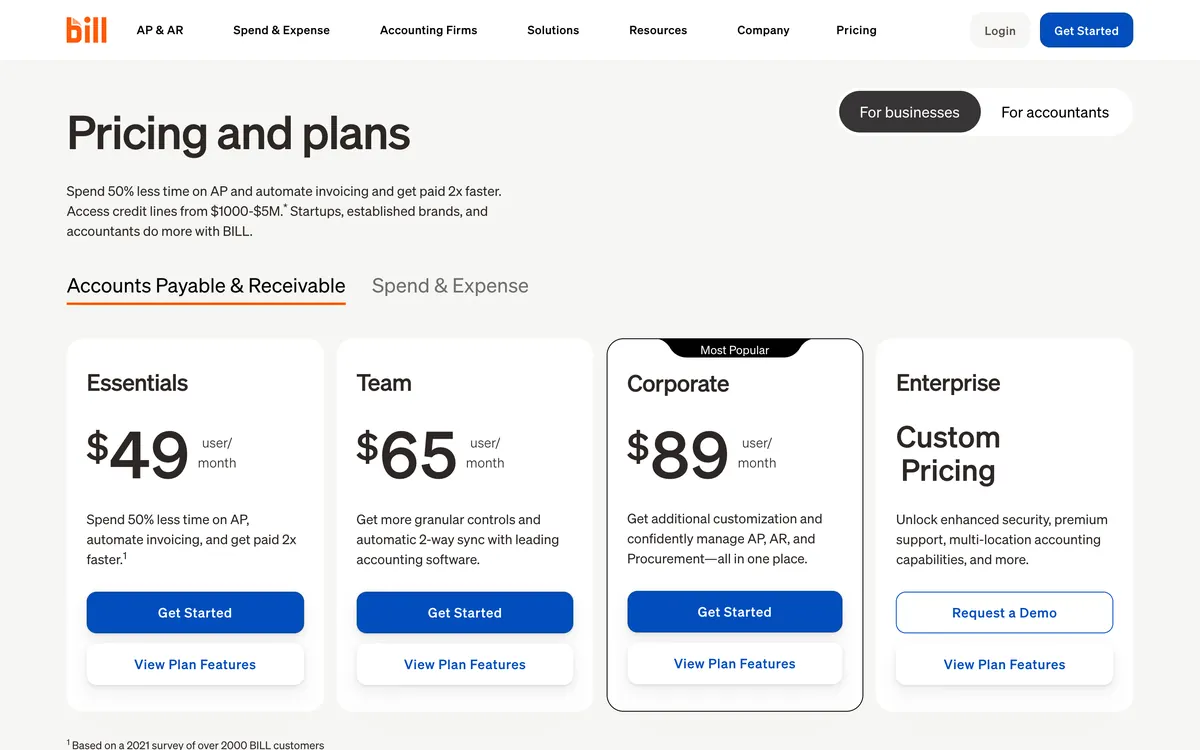
Reminders cannot be timed differently for one client and fire to every contact on any invoice with a balance, including partially paid ones.
Limitations with Bill.com. The AR feature set stops at three reminders, and reviewers call it "the most basic, bare bone features."
- Essentials syncs by CSV only; two-way ledger sync starts at $65 a user.
- Transaction fees sit on top of the seat price.
- No late fees, no statements, no payment plans, no AR-side AI.
3. Chaser, best for firms with billing teams
Best for: Established firms with a billing team.
Chaser is a credit control tool with multi-channel chasing and Creditsafe credit checks, from £199 a month for firms up to £4m turnover.
What is Chaser best for?
Choose Chaser if you are an established firm with a billing team and want email, SMS, letter and call reminders plus Creditsafe credit reports on commercial clients, on a turnover-tiered plan.
- Fits
- Firms up to £4m turnover on Compact, £10m on Core, £100m on Complete
- Regions
- UK-founded, sold internationally; auto-calls unavailable in New Zealand
- Entry cost
- £199/mo (about $259) on Compact, 4 users, 4 schedules, 100 SMS and 100 call credits; Core £599, Complete £899. A 10-day free trial is available on request: Chaser provisions it after a signup form, with no card details required.
- Rated
- 4.98 from 374 Xero App Store reviews; 4.5 from 68 on G2; 4.9 from 45 on Capterra
- Awards
- Xero App Partner of the Year 2023
- Runs on
- Xero, QuickBooks, Sage 50/200/Intacct, NetSuite, Dynamics 365, HubSpot, Gmail and Outlook
- Statutory late fees
- Yes. Four calculation types, recalculated daily, as one set of rules for the account, applied to every debtor or to selected debtors; no fees on payment-plan or partially paid invoices; line-item sync to Xero only
- Does best
- Channel breadth: email from the firm's own mailbox, SMS, letters, automated and recorded calls, plus Creditsafe credit checks and Debitura collections
- Customers
- Named on its website: Pact Coffee, Huttie and TaxAssist. Huttie's case study reports £15,000 of old debt recovered.
Chaser has chased invoices since 2014 and carries 374 Xero App Store reviews.
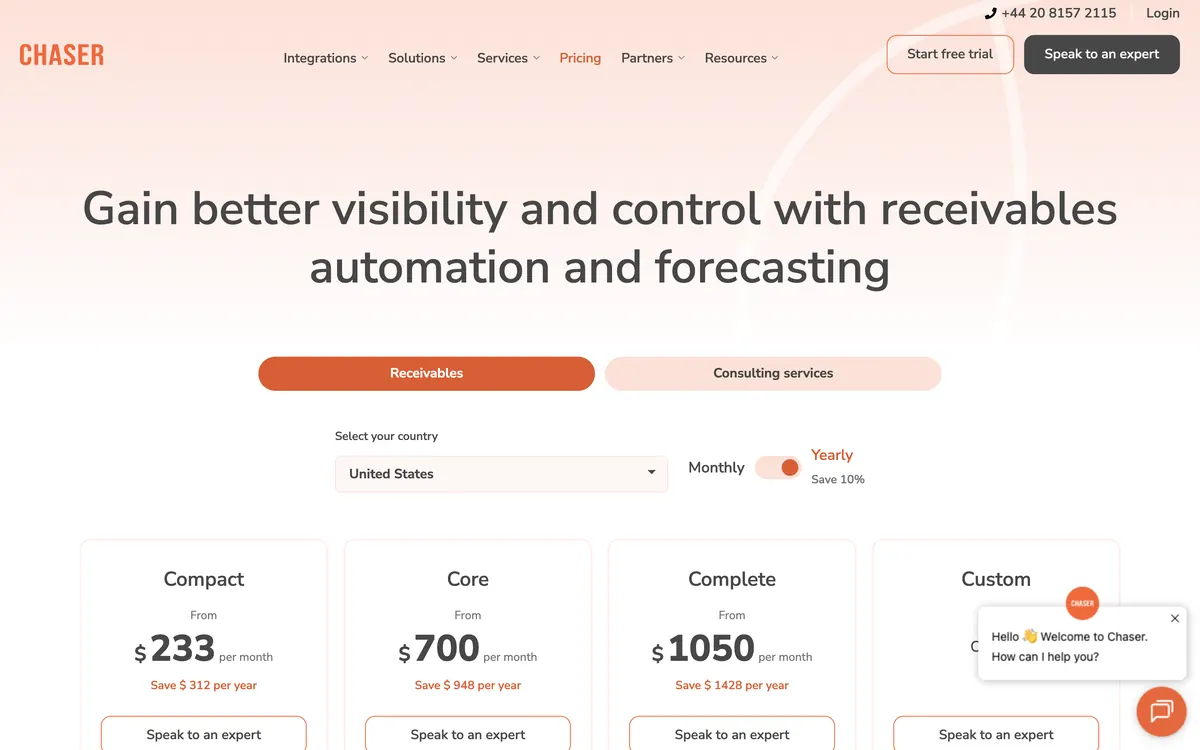
For a firm with a billing team the appeal is one tool covering every channel: reminders send from the firm's own Gmail or Outlook inbox, letters and SMS are credit-metered, and Core adds recorded in-app calls. Credit checks through Creditsafe surface director and filing data on commercial clients.
Late fees are computed daily and post to Xero as line items. Statements go out monthly on a fixed day.
Limitations with Chaser. The single set of late-fee rules is the sticking point for a firm whose engagement letters differ by practice area.
- Priced by company turnover in pounds, and a demo is needed before purchase.
- Payment-plan chasing follows the original invoice date rather than the installment dates.
- Fee line items sync to Xero only; a QuickBooks Online firm records the fee manually.
4. Invoiced, best for larger firms on ERP
Best for: Larger firms that bill from an ERP such as NetSuite, Sage Intacct or Business Central.
Invoiced is a US invoice-to-cash platform for mid-market firms on NetSuite, Intacct or Business Central, with no published price.
What is Invoiced best for?
Choose Invoiced if you are a larger firm with an ERP rather than a small-business ledger and you are evaluating an enterprise invoice-to-cash platform.
- Fits
- Not published; positioning is mid-market to enterprise
- Regions
- United States
- Entry cost
- Not published. The vendor does not publish a price
- Rated
- 4.7 from 149 on Capterra; 4.5 on G2, with 414 reviews cited on Invoiced's own site
- Awards
- None found
- Runs on
- NetSuite, Sage Intacct, Dynamics 365 Business Central; Xero and QuickBooks Online, Desktop and Enterprise integration pages maintained
- Statutory late fees
- Not documented. A dedicated late-fee automation use-case page exists; the mechanics were not confirmed
- Does best
- ERP-grade invoice-to-cash for firms already on NetSuite or Intacct, now part of Flywire
- Customers
- Named on its website: Immigrant Law Group, WebPT and iWave. Immigrant Law Group's case study reports billing management time cut by 70%.
Invoiced is a US invoice-to-cash platform, now owned by Flywire, whose positioning has moved toward the enterprise: gated white papers, persona pages for the CFO and controller, ERP integrations at the front.

Limitations with Invoiced. Nothing that decides a purchase is printed: no price, no revenue band, no verified review record.
- The enterprise pivot deprioritizes the Xero and QuickBooks Online audience its integration pages serve.
- Ask for the price sheet before a demo.
5. Kolleno, best for autonomous AI agents
Best for: Large legal groups wanting autonomous collections agents.
Kolleno is an AI order-to-cash platform priced per user in turnover bands, from $650 per user a month on BusinessPay for turnover under £1m.
What is Kolleno best for?
Choose Kolleno if you are a large firm or legal group on NetSuite, Sage Intacct or Xero and want autonomous collections agents, remittance matching and a listed Clio integration, priced per seat.
- Fits
- BusinessPay under £1m turnover, Business Plus £1m to £100m, Enterprise £100m to £1bn
- Regions
- London HQ; geo-currency pricing display
- Entry cost
- $650 per user a month on BusinessPay ($545 annual); Business Plus $1,245 per user, two-user minimum.
- Rated
- 4.9 from 117 on G2; 5.0 from 8 on Capterra; 5.0 from 18 Xero App Store reviews
- Awards
- G2 Best Software Awards 2024
- Runs on
- Xero, QuickBooks Online and Sage Intacct on the lower tiers; NetSuite, SAP, Dynamics 365, Oracle on Enterprise; Clio listed among CRM integrations
- Statutory late fees
- None found. No feature page or help article documents a late fee or interest function
- Does best
- Cash application: remittance parsing, bank-file matching, credit-note offsets, with an AI agent running collections policy
- Customers
- Named on its website: Wise, Deel and Laundryheap. Laundryheap's case study reports 94% of payments collected on time.
Kolleno is the only tool of the six that names Clio on an integration page. It runs trigger-based workflows by email, SMS and call, a branded portal with saved payment methods, payment plans split weekly or monthly, and a three-tier AI stack that scores payment likelihood, drafts messages for review and, on the Agent tier, runs collections without a person.

The product has moved upmarket from small-business credit control to enterprise order-to-cash, and a three-person billing team on BusinessPay is $1,950 a month before add-ons.
Limitations with Kolleno. Per-user pricing at $650 a seat multiplies with every person on the billing team, and no late-fee function was found.
- Custom-domain email setup is account-manager assisted.
- G2 reviewers call navigation unclear at times and reporting less customizable than they want.
- The Clio listing was not tested for this page; ask what it syncs.
6. Upflow, best for multi-office DSO control
Best for: Multi-office firms with a controller watching DSO.
Upflow is a collections analytics and cash forecasting platform for firms with a finance lead, now quote-only, last reported at $440 (Grow) and $880 (Scale) a month in 2024, so request a quote.
What is Upflow best for?
Choose Upflow if you run a multi-office firm with a controller who wants DSO, at-risk balances and collection effectiveness on a dashboard, with unlimited seats.
- Fits
- Five tiers by annual gross invoice value, under $10m to over $100m
- Regions
- New York HQ, Paris origin; 500+ customers in 30+ countries claimed
- Entry cost
- Not published; every tier is quote-only. last published at $440 and $880 a month. Payments add-on $390/mo plus card 3.5% + $0.30 and ACH 0.8% capped at $5.
- Rated
- 4.8 from 233 on G2; 4.5 from 15 on Capterra; 5.0 from 1 Xero App Store review
- Awards
- None found
- Runs on
- QuickBooks (one-way, polled every 5 minutes), Xero, NetSuite, Sage Intacct, Stripe Billing, Chargebee, Zuora
- Statutory late fees
- ERP-side only. No native computation; the documented route applies fees in NetSuite
- Does best
- Receivables analytics: countback DSO against best possible DSO, collection effectiveness, at-risk rate, cohort cash forecasting
- Customers
- Named on its website: Lattice, Vercel and Front. Lattice's case study reports 99% collection with one person in AR.
Workflows send email, SMS and letters, tasks assign calls, and a branded portal takes card, ACH and direct-debit payments with autopay. AI detects promises to pay and dispute signals in client replies.
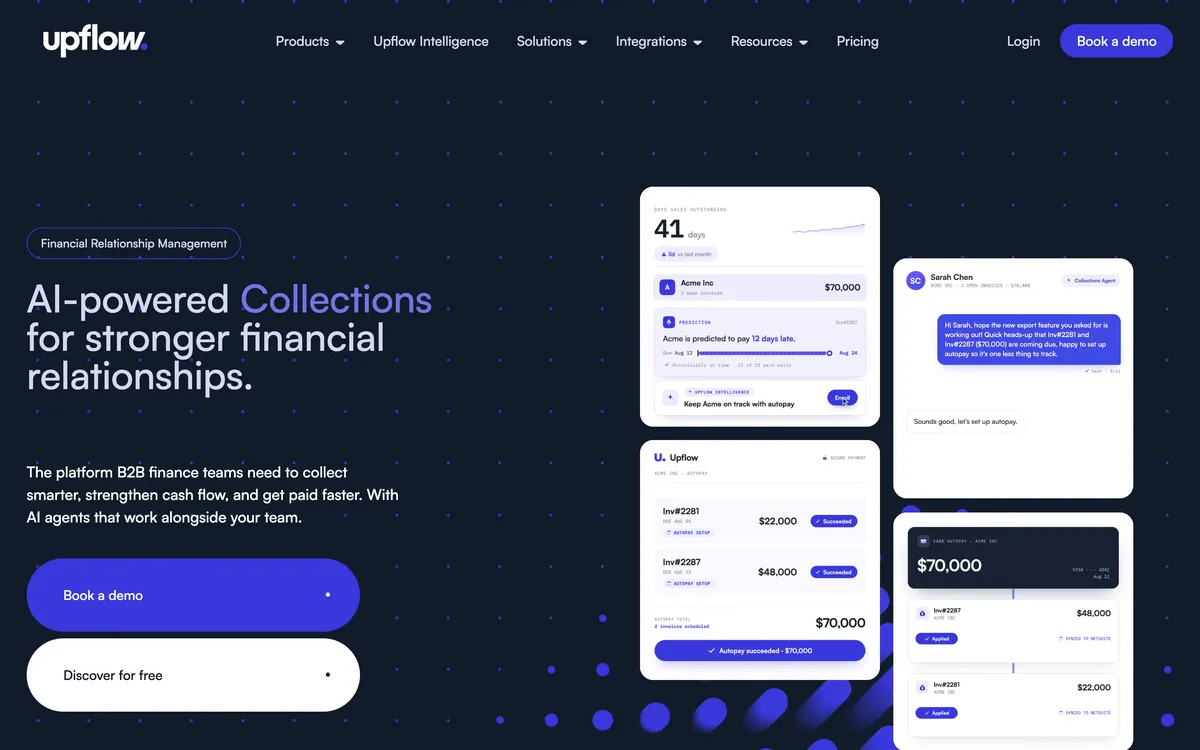
Limitations with Upflow. No price is printed at any tier, and no late fee is computed inside the tool.
- QuickBooks Online payments land in Undeposited Funds and need manual reconciliation.
- No scheduled payment plans; promises to pay and ad-hoc partial payments only.
- One Xero App Store review is too few to weigh.
How does legal billing software differ from accounts receivable software?
Clio, MyCase, CosmoLex and LeanLaw issue the bill, hold the trust ledger and send a basic reminder.
Clio sends automated payment reminders from customizable templates. LeanLaw markets trust-replenishment reminders when a retainer runs low, plus invoice reminders with read receipts. CosmoLex is described in its marketing as scheduling overdue reminders by email or text. None documents per-group chasing, a statement cycle the firm controls, or an interest charge posted to the ledger.
| Job | Billing layer (Clio, MyCase, CosmoLex, LeanLaw) | AR layer (the six above) |
|---|---|---|
| Matter, time, expenses, bill | Yes | No; reads the posted invoice |
| Trust ledger, IOLTA, three-way reconciliation | Yes | No; must be kept off trust |
| First reminder email | Yes | Yes |
| Sequenced chase per client group, SMS | Not documented | Chaser, Kolleno, Paidnice, Upflow |
| Interest or late fee posted to the ledger | Not documented | Chaser, Paidnice |
| Scheduled statements | Not documented | Chaser, Kolleno, Paidnice |
| Escalation to a named person or agency | Not documented | Chaser, Kolleno, Paidnice, Upflow |
Which tools apply late fees and interest on legal bills?
Whether the firm may charge at all depends on the engagement letter, the bill and the jurisdiction.
In the United States, ABA Model Rule 1.5 requires a reasonable fee generally set out in writing, and interest on overdue invoices is governed state by state. If the engagement letter and the bill do not state that interest is payable and at what rate, do not let software add one.
New South Wales writes that into statute. Under the Legal Profession Uniform Law s195 (AustLII), a practice may charge interest on costs unpaid 30 days or more after the bill was given, only if the bill states interest is payable and discloses the rate, at no more than the Cash Rate Target plus 2 percentage points.
In the UK, SRA Accounts Rule 7 covers interest the firm owes clients on money it holds and says nothing about interest on the firm's own overdue bills.
SRA Accounts Rules A firm with commercial clients on stated-interest terms and individual clients on none needs per-group rules: Paidnice runs them under client groups; Chaser runs one set of rules, so every client it charges pays the same rate.
Which tools offer payment plans?
Paidnice, Chaser and Kolleno offer installment plans on an invoice. Bill.com and Upflow do not, and Invoiced does not document them.
- Paidnice runs plans through Stripe or Pinch with deposits, installments and auto-pay; reminders follow the plan.
- Bill.com offers recurring invoices with auto-charge only.
- Chaser splits an invoice weekly to yearly, but chasing follows the original due date rather than the installment dates. Not on trial, Custom or Care.
- Kolleno splits weekly, monthly or bi-monthly with plan-linked automations; no interest or deposit option is documented.
- Upflow offers client-initiated partial payments and promises to pay, not a scheduled plan.
Which AR automation software fits which size of firm?
| Annual fees | Start with | Why |
|---|---|---|
| Under $1m | Practice-system reminders; Paidnice Essentials if the ledger is Xero or QuickBooks Online | $69 a month covers 150 invoices and 2 users |
| $1m to $4m | Paidnice; Chaser Compact if a billing team wants letters, calls and bureau credit checks | Chaser's entry tier caps at £4m turnover; Paidnice tiers by invoice count |
| $4m to $20m | Paidnice Pro; Chaser Core; Upflow if analytics lead the brief | Chaser Core covers to £10m with unlimited users; Upflow bands by gross invoice value |
| $20m and above | Kolleno Business Plus; Upflow Scale; Invoiced for an ERP firm | Per-user or quote-only pricing, ERP connectors, cash application |
Which AR software fits a professional services firm, by ledger?
The same test applies to accounting firms, consultancies and agencies: the project system issues the bill, the ledger holds it, the AR layer chases from the ledger.
- Xero
- Paidnice and Chaser post fees to Xero; Kolleno and Upflow connect on their lower tiers; Bill.com from Team. Xero's own reminders stop at five per organisation, with no SMS and no scheduled statements
- QuickBooks Online
- Paidnice posts fees to the QuickBooks ledger; Chaser's fee line items sync to Xero only; Upflow polls one-way every five minutes. QuickBooks itself allows three email reminders and late fees that are not retroactive. QuickBooks for Legal exists, but no documented late-fee automation was found for it
- NetSuite, Intacct, Dynamics
- Kolleno and Invoiced natively; Chaser and Upflow by connector; Paidnice on the Custom plan
- Interest stated on the engagement letter
- Chaser if one firm-wide rule is acceptable; Paidnice for per-group rules
- No interest, chasing only
- Any of the six; Bill.com if payables already run there
How much does accounts receivable software cost a law firm?
Bill.com and Kolleno charge per seat, so a three-person billing team triples the subscription, and Bill.com adds $0.59 per ACH payment and 2.9% on cards. Chaser steps by company turnover. Paidnice steps by invoice volume with no per-seat fee; Upflow bands by gross invoice value with unlimited seats.
Against 32 days of lockup on a $3m practice, roughly $263,000 of billed work waiting to be paid at any moment, the subscription is the smaller number. Check current pricing with the vendor.
What do law firms ask about AR software?
What is the best accounting software for a law firm?
Xero or QuickBooks Online for the ledger, with a legal layer on top, since neither handles trust accounting alone. Clio, MyCase, CosmoLex and LeanLaw are the legal layers the market converges on.
How many reviews do the six tools have?
Bill.com has 1,806 G2 reviews, Chaser has 374 on the Xero App Store and Upflow has 233 on G2.
What software do most law firms use?
A practice management system for matters, time and trust, a general ledger it posts to, and a payment processor. Clio reports that invoices sent electronically with a payment link collect 17 days faster than mailed ones.
What is the best billing software for law firms?
The one that keeps trust and operating money apart correctly for the firm's state bar, which is what Clio, MyCase, CosmoLex and LeanLaw are built for.
Is there a free accounts receivable software for law firms?
Practice-system reminders come with the subscription, as do five native reminders in Xero and three in QuickBooks Online. None of the six tools is free. Paidnice charges nothing for the first 20 actions; Upflow's entry tier is quote-only.
Does accounts receivable software touch client trust money?
It must not. The tools compared here chase operating invoices only, and client trust money stays in the practice system.
Which tools charge interest on overdue legal bills?
Paidnice and Chaser compute and post the charge themselves, Upflow defers to the ERP, and Bill.com, Invoiced and Kolleno document none.
What does AR software for a law firm cost each month?
Bill.com starts at $49 per user, Paidnice at $69 a month on Essentials and Chaser at £199, while Kolleno charges $650 per user.
Upflow was last reported at $440 (Grow) and $880 (Scale) a month in 2024 and is now quote-only, so request a quote, and Invoiced prints no price.
Next in this guide
QuickBooks Online
Best accounts receivable software for QuickBooks Online
What the ledger's three native reminders leave undone, and which tools finish the job.
Buyer's guide
Credit control software for Xero
The five decisions that produce a shortlist, in the order they should be taken.
Head to head
Chaser vs Paidnice
The two tools here that post a late fee themselves, compared on grain, price and channels.
Alternatives
Best Chaser alternatives
What else raises a charge, if Chaser's single set of rules is the sticking point.
Sources
12 sources, checked by Julie Turnbridge on October 26, 2026
- Intuit 2026 Late Payments Report quickbooks.intuit.com/r/small-business-data/small-busines...
- ABA, Family Advocate, Winter 2026 americanbar.org/groups/family_law/resources/family-advoca...
- CFPB consumerfinance.gov/consumer-tools/debt-collection
- G2 g2.com/products/bill-ap-ar/reviews
- Xero App Store apps.xero.com/us/app/paidnice
- Capterra capterra.com/p/254868/Paidnice
- Trustpilot trustpilot.com/review/paidnice.com
- Xero App Store apps.xero.com/uk/app/chaser
- Xero App Store apps.xero.com/uk/app/kolleno
- Xero App Store apps.xero.com/us/app/upflow
- AustLII classic.austlii.edu.au/au/legis/nsw/consol_act/lpul333/s1...
- SRA Accounts Rules sra.org.uk/solicitors/standards-regulations/accounts-rules